
Dynamic Keyword Insertion: A Conversion-Focused Guide
TL;DR:
- Dynamic keyword insertion automatically replaces placeholders with relevant keywords to improve ad relevance and performance. Proper keyword grouping, default text, and ongoing monitoring are essential for maximizing benefits and avoiding disapproval. Discipline and alignment with landing pages boost conversions and protect brand reputation in paid search campaigns.
Dynamic keyword insertion (DKI) is defined as an automated ad copy technique that replaces a placeholder in your ad text with a keyword from your ad group the moment a user's search triggers your campaign. The industry standard term is "dynamic keyword insertion," though marketers often search for it as keyword dynamic insertion. DKI is the most direct way to make a paid search ad feel personally relevant to each searcher without writing hundreds of individual ads. When executed correctly, it lifts click-through rates, improves Quality Scores in Google Ads, and reduces cost-per-click. When executed carelessly, it produces awkward, disapproved, or brand-damaging copy. This guide covers both sides.
How does keyword dynamic insertion work in Google Ads?
The mechanics are straightforward. You insert a placeholder into your ad headline or description using the syntax {KeyWord:Default Text}. When a search triggers your ad, the platform replaces the placeholder with a matching keyword from your ad group. The default text after the colon appears only when no keyword fits within the character limit.
Google Ads does not always insert the exact phrase the user typed. The platform selects a keyword from your ad group that triggered the ad, which may differ from the literal search query. That distinction matters because your ad group's keyword list controls what gets inserted, not the raw search term.
Capitalization is controlled entirely by how you format the placeholder:
{KeyWord}inserts the keyword in title case (e.g., "Running Shoes"){Keyword}inserts it in sentence case (e.g., "Running shoes"){keyword}inserts it in all lowercase (e.g., "running shoes")
Incorrect capitalization produces spammy-looking ads and lowers CTR. Title case works best in headlines. Sentence case fits naturally in description lines.
Pro Tip: Always preview your ad with several keywords from the group before launching. The preview tool in Google Ads shows exactly what each variation will look like to a searcher.
What are the benefits and risks of dynamic keyword insertion?
The case for using DKI
DKI can improve Quality Scores, lower cost-per-click, and reduce the time spent creating individual ad variations for every keyword in a large campaign. Those three benefits compound. A higher Quality Score means Google charges you less per click for the same ad position. Fewer ads to write means your team can focus on strategy rather than production.

The psychological effect is equally significant. When a searcher sees their exact query reflected in your headline, the ad feels built for them. That relevance match increases conversion likelihood, not just click-through rate. The ad earns attention before the landing page even loads.
The risks you cannot ignore
Poor keyword list management is the fastest way to turn DKI into a liability. One incorrectly inserted keyword can cause an ad to be disapproved or damage brand reputation, particularly in regulated industries like finance, healthcare, or legal services. An ad that reads "Buy Cheap Funeral Caskets" because a broad match keyword slipped through is not a hypothetical. It happens.
Trademark violations are a specific legal risk. If a competitor's brand name sits in your keyword list and gets inserted into your ad copy, you face both a policy violation and potential legal exposure. The risks worth watching include:
- Broad match keywords triggering irrelevant or offensive insertions
- Plural or singular mismatches creating grammatically broken copy
- Competitor brand names appearing in your ad text
- Compliance violations in regulated industries
- Character limit overruns that force awkward default text
Treating DKI as a shortcut rather than a systematic tool produces exactly these outcomes. The feature rewards discipline and punishes complacency.
How to optimize keyword lists and default text for DKI
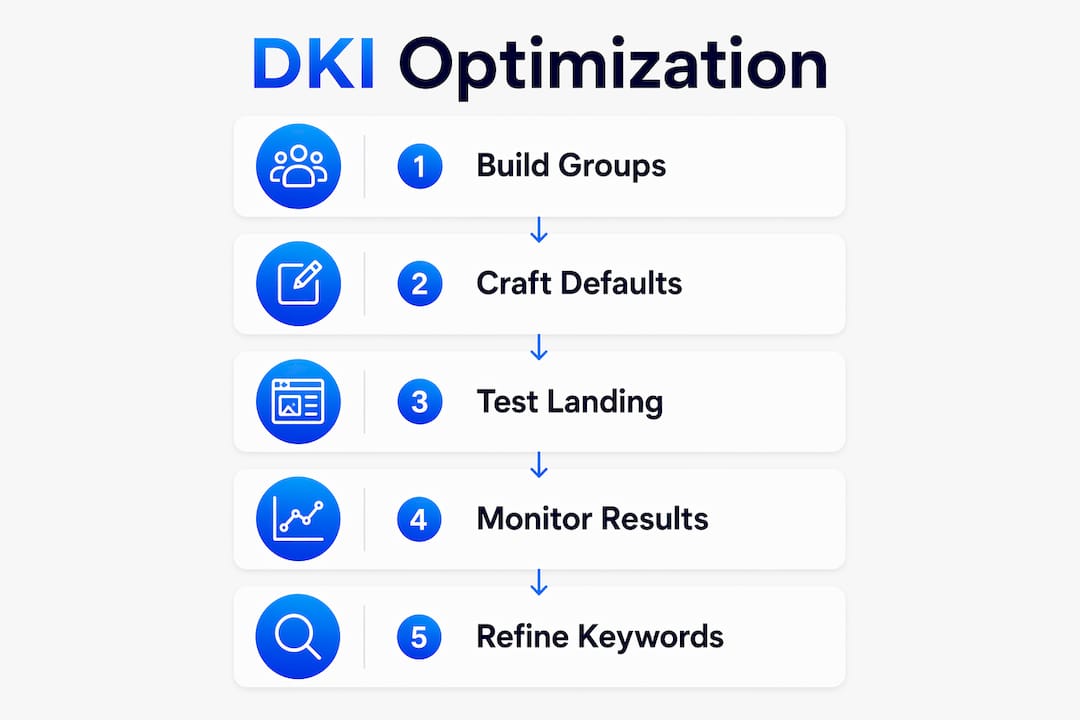
Build tight, semantically focused ad groups
The single most important structural decision in a DKI campaign is keyword grouping. Tightly themed, phrase or exact match keyword groups produce relevant, grammatically correct insertions. Broad match triggers cause what practitioners call "relevance theater": ads that look hyper-specific but send irrelevant traffic, wasting budget and hurting lead quality.
A practical grouping process looks like this:
- Start with a core theme for each ad group (e.g., "women's trail running shoes").
- Use a keyword clustering tool to group related terms by search intent before importing them.
- Limit each ad group to 10–20 tightly related keywords.
- Use phrase or exact match to prevent unintended triggers.
- Audit the list manually for plurals, misspellings, and brand names before activating DKI.
Craft default text that works on its own
Default text is not a safety net. It is a messaging component that appears every time a keyword exceeds the character limit or fails to fit the ad slot. Weak default text costs you conversions on a predictable portion of impressions.
Strong default text is specific, persuasive, and grammatically complete. "Shop Our Full Collection" outperforms "Products Available." The default should reflect the ad group's theme closely enough that it feels intentional, not like a fallback.
| Default text quality | Example | Effect |
|---|---|---|
| Weak and generic | "See Our Products" | Low relevance, poor CTR |
| Specific to ad group theme | "Shop Women's Trail Shoes" | Maintains relevance when DKI fails |
| Benefit-driven | "Free Shipping on Trail Shoes" | Adds conversion incentive |
Pro Tip: Write your default text first, before you write the DKI placeholder. If the default text alone would not make you click, rewrite it until it would.
Handle singular and plural forms deliberately. If your keywords include both "running shoe" and "running shoes," test whether the inserted form reads naturally in your headline. Awkward grammar signals low quality to both searchers and Google's ad review system.
Best practices for deploying and managing DKI campaigns
Launching a DKI campaign without a monitoring plan is the most common mistake marketers make. Regular reviews of search terms and negative keywords are necessary to maintain campaign quality and prevent budget waste. The feature is not set-and-forget.
The deployment practices that consistently produce better results:
- Start small. Launch with one or two tightly themed ad groups before scaling. Confirm that insertions look correct and relevant across a sample of real impressions.
- Review search term reports weekly. Identify queries that triggered your ad but do not match your intended audience. Add them as negative keywords immediately.
- Avoid broad match with DKI. Broad match triggers cause irrelevant or awkward keyword insertions that reduce performance and increase disapproval risk. Phrase and exact match give you control.
- Test capitalization settings. Run A/B tests on title case versus sentence case in headlines. The winning format varies by industry and audience.
- Align landing pages with inserted keywords. If your ad headline dynamically reads "Buy Waterproof Hiking Boots," the landing page must feature waterproof hiking boots prominently. A mismatch between ad copy and landing page content destroys the relevance signal you built with DKI. Dynamic landing pages that mirror the inserted keyword extend the relevance match from click to conversion.
- Monitor Quality Score by ad group. A dropping Quality Score in a DKI group signals that insertions are drifting from user intent. Investigate the search term report before adjusting bids.
Understanding how DKI performance connects to broader marketing KPIs helps you frame the results correctly for stakeholders. CTR and Quality Score are the leading indicators. Conversion rate and cost-per-acquisition are the outcomes that matter.
Key Takeaways
Dynamic keyword insertion delivers measurable ad relevance gains only when keyword lists are tightly governed, default text is crafted to convert, and campaign performance is monitored continuously.
| Point | Details |
|---|---|
| DKI syntax and capitalization | Use {KeyWord:Default Text} and control case via placeholder formatting to maintain professional ad appearance. |
| Tight keyword groups are non-negotiable | Phrase or exact match groups prevent irrelevant insertions that waste budget and risk disapproval. |
| Default text is a conversion asset | Write default text that is specific and persuasive enough to perform even without a dynamic insertion. |
| Monitor search term reports weekly | Regular negative keyword updates prevent budget waste and protect brand messaging. |
| Align ads with landing pages | Dynamic ad copy must match landing page content to preserve the relevance signal through to conversion. |
Why DKI rewards discipline more than creativity
Most marketers approach dynamic keyword insertion as a production shortcut. Write one ad, let the platform fill in the keyword, and scale across hundreds of terms. That framing is wrong, and it explains why so many DKI campaigns underperform.
The feature is a precision tool. Its value comes from the psychological relevance match it creates between a searcher's intent and your ad copy. But that match only holds when every keyword in your group genuinely belongs there. I have reviewed campaigns where a single misplaced broad match keyword was inserting a competitor's brand name into the headline. The advertiser had no idea. The ads were running, spending budget, and creating legal exposure simultaneously.
The discipline required is not technical. It is editorial. You need to read every keyword in your list the way a searcher would read it in your headline. If it sounds wrong, it will look wrong. And in paid search, looking wrong costs you money before you even notice.
The other lesson I keep returning to is the landing page alignment problem. Marketers spend real effort getting the DKI syntax right and then send every variation to the same generic landing page. The relevance signal you built in the ad evaporates the moment the page loads. The connection between ad copy and landing page content is where most of the conversion opportunity actually lives. DKI gets the click. The landing page earns the conversion.
— Juan
Gostellar's tools for your DKI campaigns
Running DKI campaigns without testing your landing page variations is leaving conversion data on the table.

Gostellar's A/B testing platform lets you test dynamic landing page variations that match the keywords your ads are inserting, using a no-code visual editor that requires no developer time. The platform's real-time analytics show you which keyword and landing page combinations actually convert, not just which ones get clicks. Gostellar also supports dynamic keyword insertion for landing pages, so the relevance match your DKI ad creates carries through to the page your visitor lands on. For marketers running paid search at any scale, that continuity is where the conversion rate gains compound.
FAQ
What is dynamic keyword insertion in Google Ads?
Dynamic keyword insertion is a Google Ads feature that automatically replaces a placeholder in your ad copy with a keyword from your ad group when a search triggers your ad. The syntax format is {KeyWord:Default Text}.
What happens when a keyword exceeds the character limit?
The platform uses your default fallback text instead of the keyword. This makes default text a critical part of your ad copy, not an afterthought.
Does DKI insert the exact search term the user typed?
No. Google Ads selects a keyword from your ad group that triggered the ad, which may differ from the literal search query. Your keyword list controls what gets inserted.
What match type works best with dynamic keyword insertion?
Phrase match and exact match produce the most relevant and grammatically correct insertions. Broad match creates unpredictable results and increases the risk of irrelevant or disapproved ads.
How does DKI affect Quality Score?
DKI improves Quality Score by increasing the perceived relevance between the search query and your ad copy. Higher Quality Scores lower your cost-per-click and improve ad position for the same bid.
Recommended
Published: 7/13/2026