
Forms Testing: A Complete Guide for Marketers
TL;DR:
- Forms testing verifies that web forms work correctly, ensuring usability, validation, security, and accurate data delivery. Teams should test all validation layers and input categories, including security threats like XSS and SQL injection, on production environments. Continuous testing after updates prevents silent failures and improves lead conversion and data integrity.
Forms testing is the systematic process of evaluating online forms to verify usability, validation logic, security, and conversion performance. Every lead capture form, signup page, and checkout field is a potential failure point. A broken submit button, a silent validation error, or a missed CRM integration can erase weeks of paid traffic spend. This guide gives digital marketers and product managers a practical framework for form testing strategies that protect lead integrity and lift conversion rates.

What is forms testing and why does it matter?
Forms testing is the practice of verifying that every input field, validation rule, and submission workflow in a web form performs correctly under all conditions. The industry term for this discipline is web form testing, which covers functional validation, security hardening, accessibility compliance, and end-to-end data delivery.
Forms carry the highest bug density in web applications. That fact matters because most teams only test the "happy path," meaning a valid name, a clean email, and a smooth submit. Real users do not behave that way, and neither do attackers.
Effective form testing covers four distinct layers. Field-level validation checks that each input accepts correct data and rejects bad data. Cross-field dependency testing verifies that conditional logic works, such as a billing address field appearing only when a checkbox is selected. Client-side browser testing confirms that JavaScript validation fires correctly in each browser. Server-side backend verification confirms that the server independently validates all submitted data, regardless of what the browser did.
Each layer catches a different class of bug. Skipping any one of them leaves a gap that either breaks the user experience or opens a security vulnerability.
The 12 input categories every form test must cover
Comprehensive form validation testing requires checking 12 input test categories per field. These categories include valid input, invalid format, boundary values, empty and null values, oversized strings, Unicode characters, special characters, whitespace-only entries, XSS payloads, SQL injection strings, duplicate submissions, and numeric edge cases.
Most teams test valid input and maybe one or two invalid formats. The categories that cause real damage are the ones teams skip: XSS payloads that execute scripts in the browser, SQL injection strings that corrupt databases, and boundary values that crash backend logic when a field receives 10,001 characters instead of the expected maximum of 10,000.
Pro Tip: Use an automated test data generator that produces all 12 input categories at once. Manually crafting XSS and SQLi payloads is slow and error-prone. Tools built specifically for form test data generation reduce that effort to seconds.
The table below maps each category to the risk it addresses:
| Input category | Risk addressed |
|---|---|
| Valid input | Confirms baseline functionality works |
| Invalid format | Catches missing format validation (email, phone) |
| Boundary values | Exposes off-by-one errors in field length limits |
| Empty / null | Reveals missing required-field enforcement |
| XSS payloads | Tests for cross-site scripting vulnerabilities |
| SQL injection | Verifies database query sanitization |
| Unicode / special characters | Catches encoding failures in storage and display |
| Duplicate submissions | Identifies missing idempotency controls |
Covering all eight categories above, plus the remaining four, is the difference between a form that works in demos and a form that holds up in production.
Which tools do you need for reliable form testing?
The right testing environment makes or breaks your results. Testing on localhost catches some bugs, but end-to-end testing on production catches the failures that actually cost leads. DNS configurations, SSL certificates, third-party script loading, and CRM webhooks all behave differently in production than in a local environment.
The core toolkit for UI forms testing includes:
- Browser DevTools for inspecting network requests, disabling JavaScript, and monitoring console errors during submission
- Form filler extensions compatible with React, Vue, and Angular for automated user input testing across all 12 categories
- Accessibility testing tools such as axe DevTools or WAVE for checking keyboard navigation, focus order, and screen reader compatibility
- Real devices for mobile usability testing, because browser emulators do not replicate touch behavior or mobile keyboard quirks accurately
- Spam defense validators to confirm CAPTCHA, honeypot fields, and rate limiting work without blocking legitimate submissions
One critical detail about framework-specific form fillers: browser form fillers must trigger the correct JavaScript events (input and change) to update the internal state of React, Vue, or Angular forms. A filler that only updates the DOM value without firing those events will cause the form to submit empty or invalid data silently. That bug is invisible in the UI and devastating in production.
Pro Tip: After filling a form with an automated tool, open the framework's DevTools panel and inspect the component state before submitting. If the state does not match what the filler entered, your tool is not triggering the right events.
A marketing automation checklist that includes form QA steps is a practical way to standardize this process across campaigns and product releases.
How to execute a step-by-step form functionality test
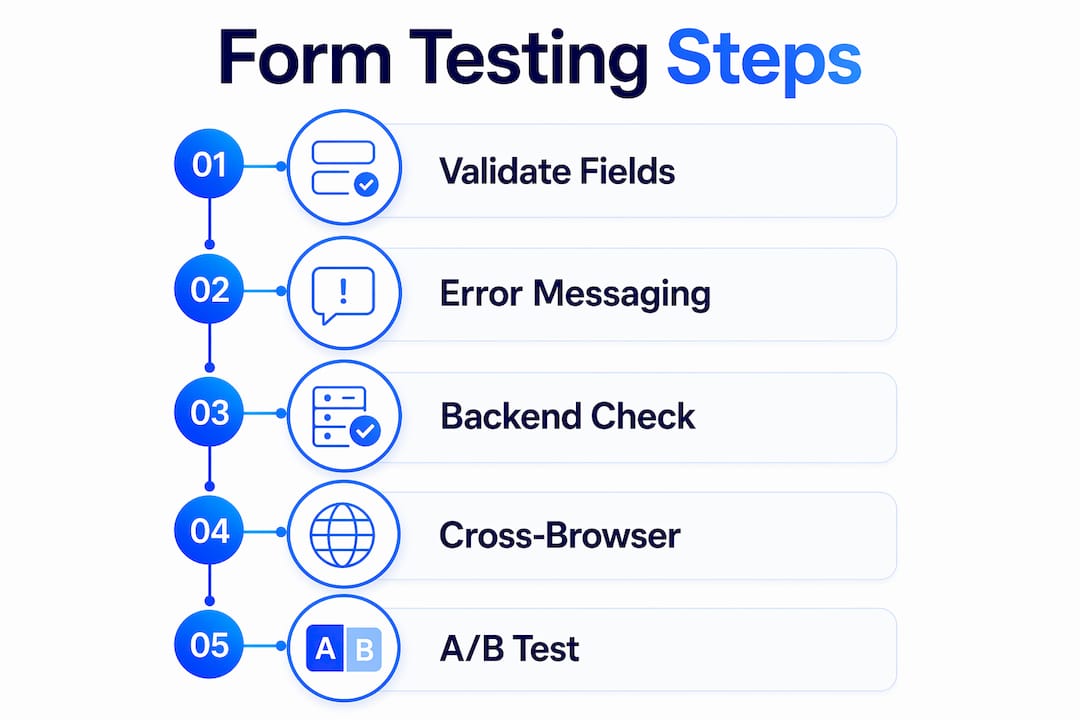
A structured testing process removes guesswork and produces repeatable results. The five steps below cover the full scope of a professional form functionality test.
Step 1: Validate all input fields across all 12 categories
Start with every field in isolation. Enter valid data, then work through invalid formats, boundary values, empty inputs, and hostile payloads. Record whether the field accepts, rejects, or crashes on each input type. Pay special attention to fields that accept free text, since those are the primary entry points for XSS and SQL injection.
Step 2: Test error messaging and user experience
Accessibility and user experience failures cause form abandonment just as reliably as broken validation. Check that error messages appear next to the relevant field, not only at the top of the page. Verify that keyboard-only navigation moves focus logically through all fields. Test with a screen reader to confirm that error states are announced correctly. Check that color is not the only indicator of an error state, since colorblind users will miss it.
Step 3: Verify backend submission and data delivery
The submit button triggers a chain of backend workflows. Verifying CRM integration, analytics tracking, and database storage is not optional. Submit a test entry and confirm that the success message appears, the confirmation email arrives within an expected timeframe, the lead appears in your CRM, and the conversion event fires in your analytics platform. Each of those four checkpoints represents a place where leads silently disappear.
Step 4: Run cross-browser and real-device testing
A form that works in Chrome may break in Safari due to differences in date input rendering or autofill behavior. Test on at minimum Chrome, Firefox, Safari, and Edge. Test on at least one iOS device and one Android device using real hardware. Mobile keyboard behavior, viewport scaling, and touch target sizing all affect completion rates in ways that desktop testing cannot reveal.
Step 5: Use A/B testing to optimize after baseline validation
Baseline validation confirms the form works. A/B testing reveals which version of a working form converts better. Test one variable at a time: field count, button copy, label placement, or inline versus top-aligned labels. Gostellar's no-code visual editor makes it straightforward to run these experiments without developer support, which keeps the feedback loop short for marketing and product teams.
Pro Tip: Never run A/B tests on a form that has not passed full baseline validation. Splitting traffic between a working variant and a broken variant produces misleading data and costs real leads.
What are the most common mistakes in form testing?
The single most common mistake is treating client-side validation as a complete test. Client-side checks are bypassable. Any user can open the browser console, disable JavaScript, and submit raw data directly to your server endpoint. Always test server-side validation independently by bypassing client-side checks using the browser console or a tool like Postman. If the server accepts malformed or malicious data without client-side checks in place, the form has a security gap regardless of how well the JavaScript validation works.
Other frequent mistakes include:
- Skipping autofill testing in JavaScript frameworks. A form filler that populates fields without triggering React or Vue state updates causes silent submission failures. The user sees a filled form. The server receives empty fields.
- Ignoring mobile real-device testing. Emulators miss touch target sizing issues, mobile keyboard overlap, and iOS Safari autofill quirks that cause high abandonment on mobile.
- Positioning error messages at the top of the form only. Users who fill long forms do not scroll back up to read errors. Inline error messages next to each field reduce confusion and re-entry friction.
- Failing to test double submission. Users who click submit twice, or who click while the network is slow, can create duplicate leads or trigger duplicate charges. Test that your form disables the submit button or shows a loading state after the first click.
- Skipping the full end-to-end submission test on production. A form that works in staging can fail in production due to environment-specific configurations. Always run at least one complete submission on the live site before launch.
The troubleshooting approach for most of these issues follows the same pattern: reproduce the failure in isolation, use DevTools to inspect the network request and response, check the server logs, and verify the data at each downstream destination (CRM, database, email inbox). Systematic re-testing after each fix confirms the resolution without introducing new regressions.
Pro Tip: Build a common pitfalls checklist into your pre-launch workflow. A written checklist takes five minutes to complete and prevents the kind of silent failures that take days to diagnose after launch.
Key Takeaways
Comprehensive forms testing covers validation, security, accessibility, and end-to-end data delivery across all four testing layers to protect lead integrity and conversion rates.
| Point | Details |
|---|---|
| Test all four validation layers | Cover field-level, cross-field, client-side, and server-side checks without exception. |
| Use all 12 input categories | Include XSS, SQL injection, and boundary values, not just valid and invalid formats. |
| Bypass client-side validation | Always test server-side validation independently to close security gaps. |
| Verify end-to-end data delivery | Confirm CRM, email, analytics, and database all receive data after every submission. |
| A/B test after baseline validation | Run conversion experiments only on forms that have passed full functional testing. |
Why I think most teams underestimate form testing
Most marketing teams treat form testing as a checkbox before launch. Submit the form once, see the success message, and ship it. I have seen that approach cost companies thousands of dollars in paid traffic that converted to zero leads because a CRM webhook was misconfigured and nobody noticed for two weeks.
The surprising part is not that bugs exist. It is that the bugs are almost always in the places nobody thought to check: the server-side validation that was never tested without JavaScript, the React form that accepted autofill values in the DOM but submitted empty state to the backend, the mobile layout where the submit button sat behind the keyboard on iOS.
Form testing deserves the same rigor as any other CRO activity. A UX and conversion rate improvement that doubles click-through rate means nothing if the form drops half the submissions before they reach the CRM. The math is simple: a form that converts at 5% but loses 30% of submissions to backend failures is actually converting at 3.5%.
The teams that get this right treat form testing as a recurring process, not a one-time pre-launch task. They test after every platform update, every third-party integration change, and every new campaign that routes traffic to a form. That discipline is what separates teams that trust their lead data from teams that wonder why their numbers never match their ad platform reports.
— Juan
How Gostellar supports form optimization for marketing teams
Gostellar gives marketing and product teams a practical way to move from baseline form validation into conversion optimization without needing a developer for every experiment.

After your forms pass functional and security testing, the next step is finding which version converts better. Gostellar's A/B testing platform runs at 5.4KB, so it adds no meaningful load time to your pages. The no-code visual editor lets you create form variants, test button copy, adjust field layouts, and track goal completions in real time. For teams running form optimization strategies across multiple campaigns, Gostellar's advanced goal tracking connects form submissions directly to conversion metrics. Start with the free plan for sites under 25,000 monthly tracked users at gostellar.app.
FAQ
What is forms testing in digital marketing?
Forms testing is the process of verifying that web forms work correctly across validation, security, accessibility, and data delivery. It protects lead integrity and conversion rates by catching bugs before they reach real users.
How many input categories should I test per form field?
Comprehensive form validation testing covers 12 categories per field, including valid input, invalid format, boundary values, empty values, XSS payloads, and SQL injection strings.
Why is server-side validation testing necessary?
Client-side validation is bypassable through the browser console. Server-side validation is the true security boundary and must be tested independently to prevent injection attacks and malformed data from reaching your database.
What does end-to-end form testing include?
A complete end-to-end test confirms that the success message appears, the confirmation email delivers, the lead appears in the CRM, and the conversion event fires in analytics. All four checkpoints must pass.
When should I run A/B tests on a form?
Run A/B tests only after the form has passed full baseline validation. Testing variants of a broken form produces misleading data and wastes paid traffic.
Recommended
Published: 7/3/2026