
Google AB Testing: A Practical 2026 Guide for Marketers
TL;DR:
- Google AB testing involves running controlled experiments to compare campaign or page variants for better performance.
- It ensures a clean traffic split, accurate attribution, and reliable results when executed properly.
Google AB testing is the practice of running controlled experiments that split paid traffic between two campaign or page variants to determine which one performs better. Marketers and business analysts use this method to make decisions based on real data rather than assumptions. The industry standard term is "A/B testing," and when applied inside Google Ads, it relies on the native Experiments tool to enforce clean traffic splits. This guide covers how to set up experiments correctly, integrate with Google Analytics 4 (GA4), and reach the 95% confidence threshold that separates valid conclusions from noise.
What is Google AB testing and why does traffic splitting matter?
Google AB testing is a controlled experiment method built into Google Ads through the Drafts and Experiments workflow. You create a draft of an existing campaign, make one change (a new headline, a different bid strategy, or an alternate landing page), then launch it as an experiment that runs alongside the original. Google splits your traffic between the two versions according to a ratio you define.
The traffic split is the most critical design decision in any A/B split test. A 50/50 split reaches statistical significance the fastest because both variants collect data at equal speed. A 70/30 or 80/20 split protects revenue in high-value campaigns by sending most traffic to the proven original, but it extends the time needed to collect enough data on the challenger variant.

Manually duplicating campaigns to simulate a split test is a common mistake. Manual duplication causes auction competition because both campaigns bid against each other for the same audience. That internal competition inflates cost-per-click, distorts attribution, and makes it impossible to know which version actually drove results. The native Experiments tool prevents this entirely.
The key advantages of using Google Ads Experiments over manual duplication are:
- Clean traffic split: Google enforces the split at the auction level, so the same user never sees both variants.
- No self-competition: The two versions do not bid against each other, keeping CPCs accurate.
- Fair attribution: Conversions are assigned to the correct variant, not split ambiguously across campaigns.
- Comparable baselines: Both variants run under identical market conditions, including seasonality and audience overlap.
Pro Tip: Always test one variable at a time. If you change the headline and the bid strategy simultaneously, you cannot know which change drove the result.
How do you set up a Google AB split test correctly?
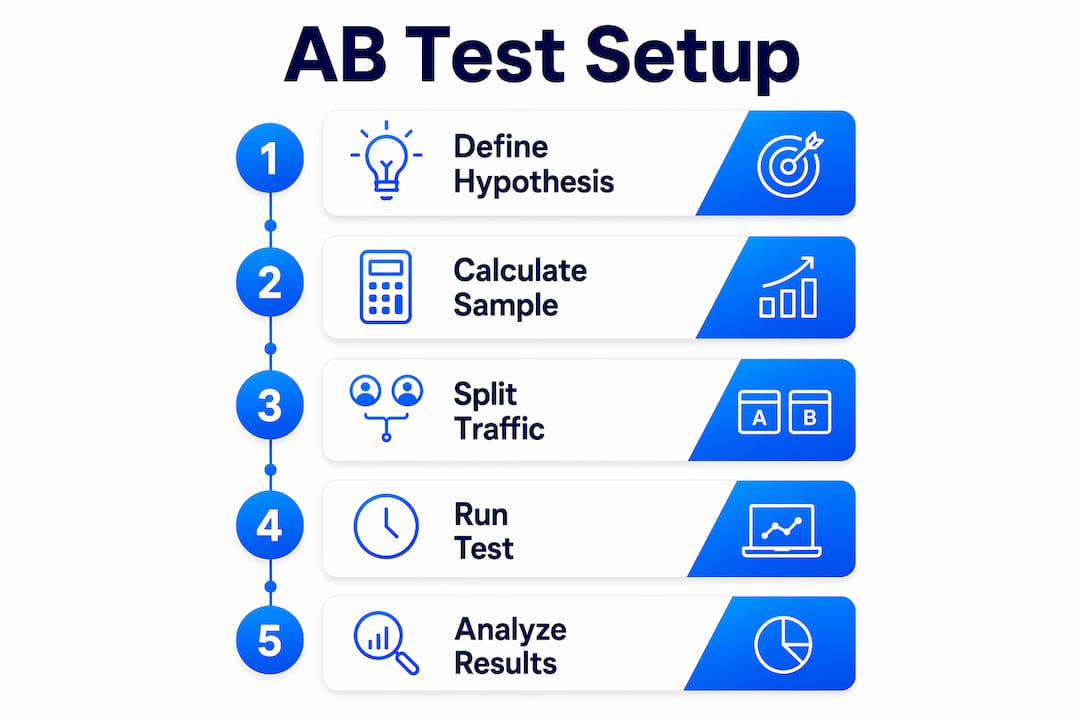
Setting up a Google A/B split test follows a specific sequence inside Google Ads. Skipping steps or rushing the timeline are the two most common reasons tests produce unreliable data.
- Create a campaign draft. Open the campaign you want to test, select "Drafts," and create a new draft. This copies the campaign exactly.
- Make one change in the draft. Edit only the variable you are testing: a single ad copy element, a landing page URL, a bidding strategy, or an audience signal.
- Launch the experiment. Convert the draft into an experiment. Set your traffic split, your start date, and your end date.
- Set the traffic split. Use 50/50 for the fastest path to significance. Use 70/30 or 80/20 when protecting revenue on a high-performing campaign matters more than speed.
- Define your primary metric. Choose one metric as your success criterion before the test starts: conversion rate, cost per acquisition, or return on ad spend.
- Let the test run. Do not pause, adjust, or evaluate results until the minimum duration has passed.
Test duration is where most marketers fail. Stopping AB tests early skews results because weekly behavior patterns (users browse differently on weekdays versus weekends) have not fully cycled through the data. The minimum recommended duration is two weeks. Four weeks produces more reliable data, especially for campaigns with lower daily traffic volume.
Sample size matters as much as duration. Typical sample sizes per variant range from 1,000 to 50,000 depending on your baseline conversion rate and the size of the lift you are trying to detect. A campaign converting at 5% needs far fewer impressions to detect a meaningful change than one converting at 0.5%.
The 95% confidence threshold is the industry standard for declaring a winner. Below 95%, the observed difference between variants could be random chance. Above 95%, you have enough statistical evidence to act on the result.
"Uneven traffic splits reduce financial risk but increase testing duration significantly, sometimes by multiple factors compared to 50/50 splits." Choosing between speed and safety is a deliberate tradeoff, not a default setting.
Pro Tip: Use a free sample size calculator (such as those from Evan Miller or AB Testguide) before launching. Enter your baseline conversion rate and your target lift to confirm your campaign has enough volume to reach significance within your planned duration.
How does Google Analytics 4 measure AB test outcomes?
GA4 is an outcome measurement platform, not a traffic assignment tool. GA4 does not assign users to variants or enforce traffic buckets. Google Ads Experiments handles the split. GA4 records what users do after they arrive.
This distinction matters because many marketers expect GA4 to manage the experiment. It does not. Your job is to pass variant information into GA4 so you can compare behavior between the two groups.
The standard method for passing variant data into GA4 uses URL parameters. Append a parameter such as ?variant=experiment to the landing page URL in your experiment campaign. GA4 captures this parameter as part of the session data. From there, you set up a custom dimension to store the variant label and use it to segment reports.
GA4 analysis workflows use custom dimensions to tag variant assignments, then compare user segments in Explorations for conversion and engagement metrics. The Explorations feature lets you build a free-form report that breaks down sessions, conversions, bounce rate, and revenue by variant.
Common pitfalls in GA4 A/B test analysis include:
- Skipping the custom dimension setup. Without it, you cannot separate variant traffic in reports.
- Relying on GA4 for significance calculations. GA4 does not calculate statistical significance natively. Use an external calculator with your raw conversion counts.
- Mixing organic and paid traffic. Filter your GA4 Exploration to paid traffic only, or variant data will include users who were never part of the experiment.
- Comparing sessions instead of users. A single user can generate multiple sessions. Use the "User" scope for your custom dimension to avoid double-counting.
Pro Tip: Tag your experiment landing page URLs with both UTM parameters and a variant parameter. UTMs feed your standard GA4 acquisition reports. The variant parameter feeds your custom dimension. Both serve different analytical purposes.
For deeper guidance on connecting GA4 data to landing page experiments, the landing page A/B testing guide from Gostellar covers sample size planning and significance thresholds in detail.
What are the best practices for Google A/B testing campaigns?
Strong Google A/B testing produces reliable results only when the test design is as rigorous as the analysis. The most common source of bad data is a poorly defined hypothesis, not a technical error.
Start every test with a specific, falsifiable hypothesis. "Changing the CTA button from 'Learn More' to 'Get a Free Quote' will increase form submissions by 15%" is testable. "Testing a new headline" is not. A clear hypothesis forces you to define your metric before the test starts, which prevents you from cherry-picking favorable metrics after the fact.
Avoid running overlapping tests on the same audience at the same time. If you are testing two different landing pages and simultaneously testing two different ad copies, you cannot isolate which change caused any observed difference. Run one test at a time per campaign, or use a multivariate framework if your traffic volume supports it.
Prioritize metrics that connect to revenue, not just clicks. Google Ads has expanded native testing for Performance Max campaigns, including asset set comparisons and secondary metric tracking. Use this to measure downstream outcomes like revenue per conversion, not just conversion volume.
Control for external factors. A test that runs across a major holiday, a product launch, or a competitor price change will absorb those effects into the results. If an uncontrollable external event occurs mid-test, extend the duration or restart the experiment after conditions normalize.
For a broader framework on experiment design, the AB testing best practices guide from Gostellar outlines the principles that apply across both Google Ads and landing page experiments. Pairing those principles with conversion rate optimization strategies gives you a complete picture of how to act on test results once a winner is declared.
Key Takeaways
Google AB testing produces valid results only when traffic splits are controlled natively, tests run long enough to reach 95% confidence, and GA4 is used as a measurement layer rather than an experiment manager.
| Point | Details |
|---|---|
| Use native Experiments | Google Ads Experiments prevents auction self-competition and ensures clean attribution. |
| Match split to risk tolerance | Use 50/50 for speed; use 70/30 or 80/20 to protect revenue on high-value campaigns. |
| Run tests for 2–4 weeks | Weekly behavior cycles require full coverage to avoid skewed early results. |
| Pass variant data into GA4 | Use URL parameters and custom dimensions to segment variant performance in Explorations. |
| Reach 95% confidence | Declare a winner only after crossing the 95% threshold using an external significance calculator. |
Why most Google AB tests fail before the data is even collected
The failure mode I see most often is not a technical one. Marketers launch a test, check results after five days, see one variant leading by 20%, and call it done. That decision is almost always wrong. Weekly patterns in user behavior mean that early data is structurally biased toward whatever day of the week the test launched. A test that starts on a Monday will over-represent weekday behavior in its first few days. By day five, you have not seen a full cycle.
The second failure mode is manual campaign duplication. I have audited accounts where teams ran "split tests" by duplicating campaigns and splitting the budget manually. Every single one of those tests was contaminated by auction competition. The CPCs were inflated, the attribution was split across both campaigns, and the "winner" was often just the campaign that happened to get slightly more budget on a high-intent day. Native Google Ads Experiments exist precisely to prevent this, and they are free to use.
The third failure is treating GA4 as the experiment platform. GA4 is excellent at measuring what users do. It does not control who sees what. Marketers who expect GA4 to manage their traffic split end up with no clean variant data at all. Pair GA4 with Google Ads Experiments, pass variant labels through URL parameters, and calculate significance externally. That three-part workflow is the only one that produces data you can trust.
Patience and rigor are not optional in A/B testing. They are the method.
— Juan
How Gostellar fits into your Google AB testing workflow
Running clean Google AB tests requires the right infrastructure on the landing page side, not just inside Google Ads.

Gostellar gives marketers a no-code visual editor to build and deploy landing page variants without developer support. Its 5.4KB script keeps page load times fast, which matters because slow pages distort conversion data and penalize your Quality Score. Gostellar's real-time analytics and advanced goal tracking let you monitor variant performance as data comes in, and its dynamic keyword insertion keeps landing page messaging aligned with the ad copy being tested. For teams running Google A/B split testing across multiple campaigns, Gostellar removes the technical friction that slows down iteration.
FAQ
What is Google AB testing?
Google AB testing is a controlled experiment method that splits paid traffic between two campaign or page variants using Google Ads Experiments. The goal is to identify which version produces better performance based on a predefined metric.
How long should a Google AB split test run?
A Google AB split test should run for at least two weeks, with four weeks recommended for campaigns with lower traffic volume. Shorter durations risk skewed results due to incomplete weekly behavior cycles.
What traffic split should I use for Google A/B testing?
Use a 50/50 split for the fastest path to statistical significance. Use a 70/30 or 80/20 split when you need to protect revenue on a high-performing campaign while still collecting challenger data.
Does GA4 run AB tests natively?
GA4 does not assign users to variants or manage traffic splits. It functions as a measurement layer. Variant data must be passed into GA4 via URL parameters and custom dimensions for analysis in Explorations.
What confidence level is required to declare a winner?
The industry standard is 95% confidence. Results below this threshold may reflect random variation rather than a true performance difference between variants.
Recommended
Published: 7/5/2026