
How to Test in Production Safely: A Practical Guide
Testing in production, often shortened to "test prod," is the deliberate practice of validating code on live systems using controlled techniques that limit blast radius. The verdict: it is safe with the right controls and genuinely dangerous without them. Your first move should be a feature flag, not a canary, not chaos engineering. Flags give you instant rollback without touching traffic routing.
Three things to do right now:
- Implement one feature flag on your riskiest upcoming change before it ships.
- Define your rollback threshold (for example, error rate above 0.5% triggers immediate disable).
- Confirm you have structured logs, a metrics dashboard, and at least one alert before you expose any real users.
Pro Tip: If you cannot answer "how do I roll this back in under two minutes?" before you start, you are not ready to test in production.
Key Takeaways
Testing in production is safe when you have feature flags, canary rollout controls, and full observability in place before the first user is exposed.
| Point | Details |
|---|---|
| Feature flags first | Wrap every production change in a flag with a tested kill switch before exposing real users. |
| Canary at 1–5% | Start canary rollouts at 1–5% of traffic and expand only when p95 latency and error rate stay within threshold. |
| Three observability layers | Structured logs, time-series metrics, and distributed tracing must all be active before any production experiment starts. |
| Governance prevents debt | Every flag needs an owner, a TTL, and a rollback threshold defined before it goes live. |
| Gostellar for experiments | Stellar's real-time analytics and no-code editor give teams the metric signal and targeting controls to run safe production experiments without heavy infrastructure investment. |
Table of Contents
- What does "prod" actually mean, and how is it different?
- Why do teams run tests in production?
- What are the real risks, and when should you avoid it?
- What are the primary safe techniques for testing in production?
- What observability do you need before you test in production?
- How do you run your first safe production experiment this week?
- How do you keep production testing sustainable over time?
- What tooling categories should you evaluate?
- How does Stellar fit into safe production testing?
- Why production testing changed how I think about quality
- Stellar makes your first production experiment faster to run
- Sources
What does "prod" actually mean, and how is it different?
Production, or "prod," is the live environment where real users interact with your software. Every other environment exists to approximate it. The DTAP model (Development, Testing, Acceptance, Production) describes the standard progression: developers write code locally, automated tests run in a testing environment, user acceptance testing (UAT) happens in the acceptance stage, and only then does code reach production.
The gap between acceptance and production is where most surprises live. Production carries real user data, real traffic patterns, third-party API behavior that staging vendors don't replicate, and infrastructure that drifts over time. A staging environment might run on a single database replica; production runs on a sharded cluster with read replicas and connection pooling under load. Those differences matter for latency, for failure modes, and for how your code actually behaves.
Some behaviors simply cannot be validated anywhere else. A/B test conversion rates depend on real user psychology. Payment gateway timeouts depend on real transaction volume. CDN cache behavior depends on real geographic distribution. Martin Fowler's QA in Production frames this directly: production is not just another environment, it is the only environment where you can learn from real-world conditions.
Why do teams run tests in production?
Pre-production testing catches a lot, but it has structural limits. Staging environments are static snapshots of a system that is always changing. Third-party services behave differently under real load. Device and browser diversity in the wild dwarfs what any device lab covers.
The practical reasons teams test in production:
- Real user behavior: Conversion rates, click paths, and session lengths in staging are proxies at best.
- Third-party variability: Payment processors, ad networks, and identity providers behave differently in production.
- Scale and latency: A query that runs in 40ms against 10,000 staging rows can take 800ms against 200 million production rows.
- Regional variants: Tax rules, currency formatting, and compliance requirements differ by geography and only surface with real traffic.
- Device diversity: Real users bring browsers, OS versions, and network conditions no lab fully replicates.
The performance data behind this is striking. According to DORA research, elite engineering teams deploy far more frequently than low performers. That cadence is only possible when teams have the observability and controls to validate in production continuously rather than waiting for long pre-production cycles.
Elite teams deploy 182x more frequently than low performers (DORA). The difference is not just CI/CD pipelines. It is the confidence to validate in production with controls.
What are the real risks, and when should you avoid it?
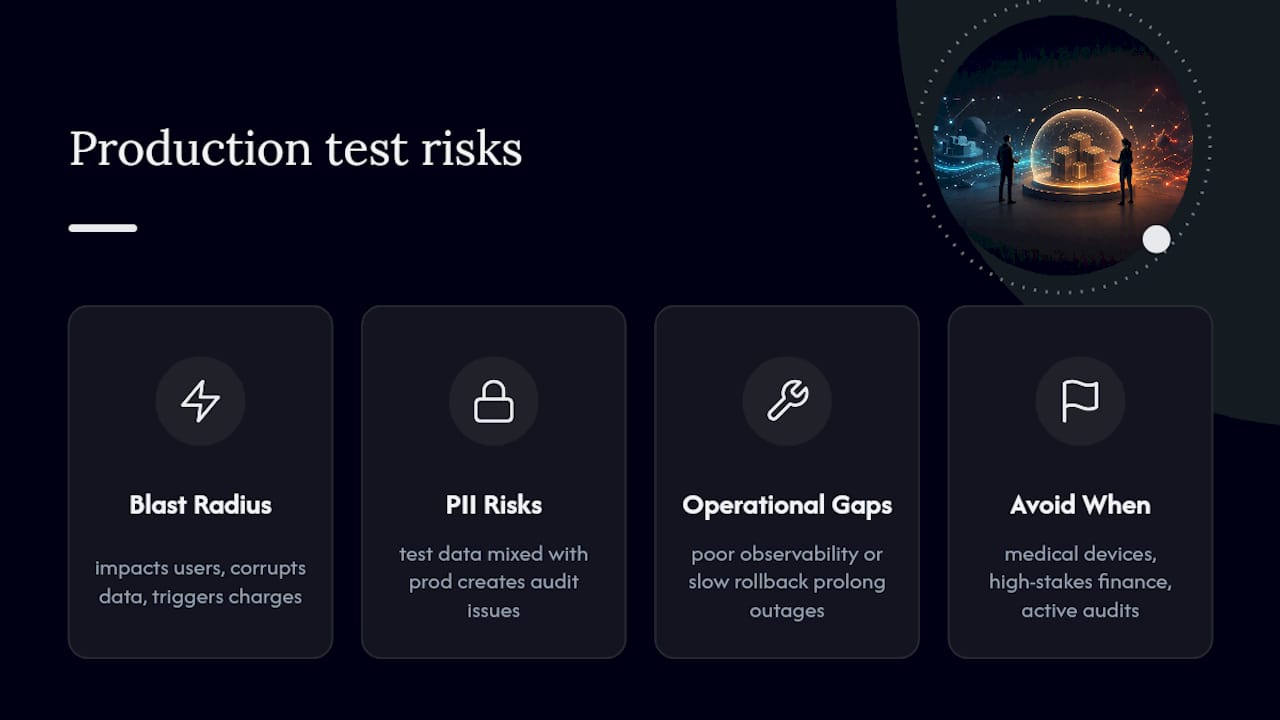
Production testing increases your operational surface area. The risks fall into three categories.
Blast radius: A bad experiment can affect real users, corrupt real data, or trigger real financial transactions. Without targeting controls, a single misconfigured flag can expose every user to a broken experience simultaneously.
Compliance and PII leakage: Test data mixed with production data creates audit and regulatory problems. GDPR, HIPAA, and SOC 2 all have opinions about what happens when test payloads touch production records. Synthetic test accounts must be clearly labeled and isolated from real user records.
Operational gaps: Missing observability, slow rollback procedures, and absent runbooks turn a small incident into a prolonged outage. If your team cannot detect a problem within minutes and revert within two, the blast radius grows with every passing second.
Some contexts warrant extra caution or outright avoidance of certain production tests. Medical device software, high-stakes financial transaction flows without strict isolation, and systems under active regulatory audit are environments where the cost of a production incident exceeds any learning benefit. In those cases, invest in better staging fidelity instead.
Pro Tip: A useful one-sentence rule: if a failure in this experiment would require a public disclosure, a customer refund, or a compliance report, add one more layer of isolation before you run it in production.
What are the primary safe techniques for testing in production?
ContextQA's breakdown of production testing techniques covers the canonical set: feature flags, canary releases, dark launches, synthetic monitoring, and chaos engineering. Each has a different risk profile and a different entry cost.
Feature flags
Feature flags are the safest first step because they require no traffic routing changes. You wrap new code in a conditional, deploy it dark (inactive), and enable it for a specific user segment. Instant rollback means disabling the flag, not reverting a deployment.
Checklist for proper flag usage:
- Assign an owner and an expiry date to every flag at creation.
- Test the kill switch before you expose any users.
- Use targeting rules (internal users first, then a small percentage of real users).
- Log every flag evaluation so you have an audit trail.
LaunchDarkly's guide to testing in production emphasizes that flags enable progressive exposure and immediate rollback without the complexity of traffic routing, making them the right entry point for most teams.
Canary releases
A canary routes a small percentage of live traffic to the new version while the rest continues on the stable version. Compare key metrics between the canary cohort and the control group. Expand only when those metrics stay within acceptable thresholds.
Rollout progression example:
- Internal employees only (dogfooding).
- 1% of production traffic.
- 5% of production traffic.
- One geographic region.
- Global rollout.
Dark launches
A dark launch sends real production requests to a new code path in parallel with the existing path, but discards the new path's response. Users see nothing different. You get real load, real data shapes, and real failure modes without any user impact. The trade-off is running dual code paths simultaneously, which adds infrastructure cost and requires careful data handling to avoid writing side effects from the shadow path.
Synthetic monitoring
Synthetic monitoring runs scripted user journeys against production continuously, even when no real users are active. Script your most critical paths: login, checkout, account creation, API key generation. Run them every minute from multiple geographic locations. When a synthetic check fails, you know before a real user does.
Chaos engineering
Chaos engineering deliberately injects failures into production to verify that resilience mechanisms work. It is an advanced technique. Per Microsoft's shift-right guidance, fault injection must be automated and scheduled, and it should only run after circuit breakers, fallbacks, and graceful degradation are proven in both staging and production for non-critical cohorts.
Controls checklist for any technique:
- Blast radius is bounded (targeting rules, traffic percentage, or shadow mode).
- Rollback is automated and tested.
- Observability is in place before the experiment starts.
- An owner is named and on-call for the duration.
What observability do you need before you test in production?
Observability is not optional. Without it, you cannot detect problems fast enough to limit blast radius. Three layers are required, and all three must be in place before any production experiment starts.

Structured logging gives you queryable, machine-readable records of what happened and when. Free-text logs are not enough. Every log line should carry a trace ID, a user segment identifier, and the flag or experiment name so you can filter by experiment cohort instantly.
Metrics give you the aggregate signal. Prometheus-style time-series metrics let you compare canary cohorts against control groups on the same dashboard. Define your SLOs before the experiment: p95 latency, error rate, and a business metric (conversion rate, checkout completion) for every experiment.
Distributed tracing connects a single user request across every service it touches. When a canary introduces a latency regression, tracing tells you which service and which code path is responsible. Without it, you are debugging with a flashlight in a dark room.
Full structured observability reduces mean time to detect (MTTD) dramatically compared to log-only monitoring. Short detection windows are what keep blast radius small.
| Observability layer | Key signal | Example SLO |
|---|---|---|
| Structured logs | Error events, flag evaluations | Zero unhandled exceptions in canary cohort |
| Metrics | Latency, throughput, error rate | p95 latency within 20% of control |
| Distributed tracing | Per-request service latency | No new slow spans introduced by canary |
| Business metrics | Conversion, revenue, engagement | Conversion rate within 5% of control |
Alerting should fire within minutes of a threshold breach, not hours.
How do you run your first safe production experiment this week?
Follow this sequence. Do not skip steps.
- Confirm preconditions. Automated deploys, rollback automation, a runbook, observability on all three layers, and a named owner. If any of these are missing, fix them first.
- Pick one low-risk change. A UI copy variant or a new API endpoint with no write side effects is a better first experiment than a payment flow change.
- Implement a feature flag. Wrap the change. Test the kill switch. Target internal users only for the first 24 hours.
- Define your rollback threshold. Write it down before you expose anyone: "If error rate exceeds X% or p95 latency increases by Y%, disable the flag immediately."
- Create a canary target group. After internal validation, route 1% of real traffic to the new path.
- Script one synthetic journey that covers the affected code path and run it every minute.
- Monitor for 24 hours at each traffic percentage before expanding.
- Run a post-mortem after the experiment closes, whether it succeeded or not. Document what you learned.
CircleCI's production testing guidance describes stepwise release policies and automated rollback as the backbone of repeatable, safe production testing. The runbook for your first experiment should fit on one page: what the experiment is, who owns it, what the rollback threshold is, and who to page if the threshold is breached.
Microsoft's shift-right testing documentation recommends starting with a small initial cohort that runs a standard integration suite before any broader traffic expansion. That pattern maps directly to the internal-first flag targeting described above.
For practical tactics on structuring production experiments for conversion goals, the production test development strategies guide covers CRO-focused rollout patterns in more detail.
How do you keep production testing sustainable over time?
The biggest long-term risk is not a bad experiment. It is accumulated testing debt: flags that never get cleaned up, experiments that run indefinitely, and on-call rotations that have no idea which flags are active.
Flag hygiene requires three things: a time-to-live (TTL) set at creation, an owner tag on every flag, and a regular cleanup review (weekly or sprint-based). A flag that has been live for six months with no owner is a liability, not a feature.
Experiment governance means you have an approval gate before any experiment touches production. A lightweight experiment registry (even a shared spreadsheet works at first) should record the experiment name, owner, start date, rollback threshold, and expected end date. Metric contracts define what "success" means before the experiment starts, not after.
Ownership and on-call responsibility must be explicit. The engineer who ships the flag is on-call for it. That accountability loop is what keeps experiments from becoming permanent fixtures.
Pro Tip: Set a hard limit on concurrent active flags per team. Five is a reasonable ceiling for most teams. Beyond that, the cognitive load of understanding which flags interact with each other becomes a reliability risk on its own.
Martin Fowler's QA in Production argues that a continuous delivery pipeline and monitoring are prerequisites for production QA to be beneficial rather than harmful. Governance is what makes that pipeline sustainable.
What tooling categories should you evaluate?
No single tool covers everything. Evaluate tools by category and by the specific features each category must provide.
Feature-flag and feature-management platforms need: a kill switch that works in under 30 seconds, user targeting by segment or percentage, audit logs of every flag change, and SDK support for your stack.
Release orchestration and traffic routing tools need: canary and blue-green deployment support, automated rollback triggers based on metric thresholds, and integration with your CI/CD pipeline.
Observability platforms need: time-series metrics with alerting, structured log ingestion with query support, and distributed tracing with service maps. Evaluate whether the platform supports experiment-aware dashboards (filtering metrics by flag or cohort).
Experimentation and A/B platforms need: statistical significance calculations, segment targeting, and real-time result dashboards. For teams focused on conversion and growth, a lightweight split testing platform that integrates with your existing analytics stack can reduce setup time significantly.
Synthetic monitoring services need: scripted journey support, multi-region probes, and alerting on journey failure with a short detection window.
Key evaluation questions for any tooling category:
- Does it support automated rollback, or is rollback manual?
- Can you filter dashboards and alerts by experiment cohort?
- Does it have audit logging for compliance?
- What is the SDK footprint, and does it add meaningful latency?
How does Stellar fit into safe production testing?
Stellar, Gostellar's A/B testing platform, maps directly to several of the controls described in this guide. Its real-time analytics dashboard functions as the business-metric layer of your observability stack during a production experiment: conversion rate, goal completions, and session behavior update live, so you can detect a regression in your experiment's primary metric without waiting for a batch report.
The no-code visual editor supports safe dark-launch-style experiments on UI changes. You can deploy a variant to a targeted segment without touching your deployment pipeline, which keeps the blast radius narrow and the rollback path simple. At 5.4KB, the Stellar script adds minimal page-weight overhead, which matters when you are measuring performance as part of your experiment's success criteria.
For teams running canary-style experiments on landing pages or conversion flows, Stellar's goal tracking and real-time analytics give you the metric signal you need to make expand-or-rollback decisions quickly. More details on how Stellar's features support production experimentation are available on the Gostellar blog.
Why production testing changed how I think about quality
The conventional framing of production testing is that it is a risk to manage. That framing is backwards. Pre-production environments are the risk: they give you false confidence that you have seen the system behave correctly, when what you have actually seen is the system behave correctly under conditions that do not exist in the real world.
Production testing, done with the controls described here, is not a shortcut around quality. It is the only way to close the feedback loop between what you ship and what users actually experience. The teams that treat production as a learning environment, not just a deployment target, are the ones that catch real failure modes before they become incidents. They also tend to ship faster, because they are not paralyzed by the fear that staging did not catch something.
The accountability piece matters too. When the engineer who ships the flag is also on-call for it, the quality of the flag implementation goes up. Ownership concentrates the incentive to get the controls right the first time.
Stellar makes your first production experiment faster to run
Running a safe first production experiment does not require months of infrastructure work. Stellar gives you real-time analytics and a no-code visual editor so you can target a user segment, measure conversion, and roll back in minutes, not days. The 5.4KB script keeps your page performance clean while the experiment runs, and the goal tracking layer gives you the business-metric signal you need to make a confident expand-or-rollback call.

If your team is ready to move from staging-only validation to controlled production experiments, Stellar's free plan covers up to 25,000 monthly tracked users, which is enough to run a real canary experiment on a meaningful traffic segment. Start your first production experiment with Stellar and see how fast a controlled test can close the gap between what you shipped and what users actually experience.
Sources
The sources below are the primary references for this guide. Each one covers a distinct angle worth reading in depth.
- Testing in Production: Strategy, Tools, and Trade-offs
- Testing in Production to Stay Safe and Sensible - LaunchDarkly
- Shift right to test in production - Azure DevOps | Microsoft Learn
- Testing In Production - CircleCI
Recommended
Published: 8/8/2026