
Check Website Pages for A/B Test Readiness in 2026
A page passes if three things are true: the experiment script is present and loading correctly, variant assignment is being recorded, and your primary conversion events fire only after consent is granted. That's the whole test. Everything else in this guide is about proving those three things hold up under real conditions.
Start with these three checks before anything else. First, confirm there's no Sample Ratio Mismatch (SRM), the signal Microsoft Research identifies as a reliable early indicator that assignment or instrumentation is broken. Second, verify your consent management platform (CMP) actually gates tracking on reject. Third, confirm your event map connects exposure to conversion with no gaps in the payload.
- SRM check: Compare observed assignment split against planned allocation within the first few thousand visitors.
- CMP enforcement: Open a fresh incognito session, reject all consent, and confirm no experiment beacons fire.
- Event mapping: Trace the full path from exposure event to conversion event in your network logs, verifying variant IDs appear in both.
Pro Tip: Run all three checks in a fresh browser profile with network log preservation enabled. Stale cookies or cached scripts will give you false positives that waste hours.
Key Takeaways
A page is test-ready only when the experiment script is present, variant assignment is recorded with correct IDs, and conversion events fire exclusively after consent is granted.
| Point | Details |
|---|---|
| Run the 10-step checklist first | Script presence, CMP gating, and beacon validation take 10–15 minutes and catch most failures before launch. |
| Check SRM within 2,000 visitors | Early SRM detection prevents weeks of invalid data from a broken assignment split. |
| Test all four consent states | First visit, reject-all, partial-accept, and returning visitor states must each be verified separately. |
| Smoke tests require sign-off from three roles | PM, engineer, and QA each own a distinct part of the pre-production runbook. |
| Gostellar automates the hardest checks | Its consent-aware SDK, real-time assignment logging, and automated SRM alerts reduce manual verification effort significantly. |
Table of Contents
- How to check website pages for test readiness: 10-step checklist
- Developer and QA technical verification: what to check and how to prove it
- How to detect Sample Ratio Mismatch and validate traffic allocation early
- Consent management and privacy gating: does tracking honor user choices?
- Feasibility review: will this experiment actually answer your question?
- Pre-production smoke tests: the runbook to follow before full rollout
- Vendor JS integrity, monitoring, and contractual controls
- Typical timeline and effort to verify pages before running tests
- How Gostellar simplifies checking website pages for A/B tests
- GDPR, CCPA, and privacy compliance beyond consent management
- How to validate dynamic content and SPA page changes
- How to document and communicate page status to stakeholders
- Automated monitoring and alerting for ongoing instrumentation health
- The case for slowing down before you launch
- Gostellar makes experiment readiness faster for growth teams
- Sources
How to check website pages for test readiness: 10-step checklist
Use this against any page before you start a test. Budget 10–15 minutes per URL. A single "fail" is a blocker; fix it before proceeding.
- Script presence: Confirm the experiment script tag exists in the page source. Search for the vendor SDK domain or script ID.
- Async load mode: Verify the script loads asynchronously (or uses an inline bootstrap snippet) so it doesn't block page render.
- Console errors: Open Chrome DevTools → Console. Zero errors related to the experiment SDK is the pass state.
- Network tab — exposure beacon: Filter requests by the vendor domain. Confirm an exposure event fires on page load with a valid variant ID.
- Primary conversion event: Trigger the conversion action (click, form submit, purchase). Confirm the conversion beacon fires and contains the correct event name and variant ID.
- CMP gating: Reject all consent. Reload. Confirm no experiment requests appear in the Network tab.
- Sample allocation: Check your experiment dashboard for assignment counts. Flag any deviation from the planned split.
- Event payload properties: Inspect the exposure and conversion beacons for required fields: variant ID, user/session identifier, timestamp, and event name.
- Cross-browser pass: Repeat steps 3–5 in Safari (or Firefox). Different JS engines surface different failures.
- Record evidence: Export network logs (HAR file) and take annotated screenshots. This is your sign-off artifact.
Pro Tip: Use a fresh browser profile for every audit session. Existing cookies, extensions, and cached scripts corrupt results and make failures impossible to reproduce for your engineering team.
Developer and QA technical verification: what to check and how to prove it
Script load order matters more than most marketers realize. An experiment SDK that initializes after a tag manager fires conversion pixels will miss early-session assignments. Check the DOM order: the experiment snippet should appear before any analytics or conversion tags that depend on variant data.
For async SDKs, the safest pattern is an inline bootstrap snippet that handles variant assignment synchronously (preventing flicker), followed by the full SDK payload loading asynchronously. This balances web page performance optimization against assignment reliability. Measuring Total Blocking Time (TBT) and Time to Interactive (TTI) using the Performance API or Chrome DevTools before and after SDK integration confirms whether the script is hurting page speed.
Verify exposure and conversion beacons contain these fields:
variant_id(string, not null)experiment_iduser_idorsession_idtimestamp(ISO 8601)event_name(e.g.,experiment_exposure,purchase_complete)
Cross-reference every field against your documented tracking plan. A beacon missing variant_id means your conversion data is unattributable.
| Check | Pass Condition | Fail Condition |
|---|---|---|
| Script load order | Experiment SDK fires before analytics pixels | Analytics fires before SDK initializes |
| Exposure beacon | Contains variant ID, fires on page load | Missing variant ID or fires on reject |
| Conversion beacon | Contains variant ID, fires on action | No variant ID or fires without user action |
| Console errors | Zero SDK-related errors | Any JS error in experiment namespace |
| Data-layer match | Event properties match tracking plan | Missing or misnamed properties |
Pro Tip: When your vendor requires a synchronous snippet to prevent content flicker, use an inline bootstrap snippet for assignment only, then load the full SDK asynchronously. This keeps your site performance intact without sacrificing assignment accuracy.
How to detect Sample Ratio Mismatch and validate traffic allocation early
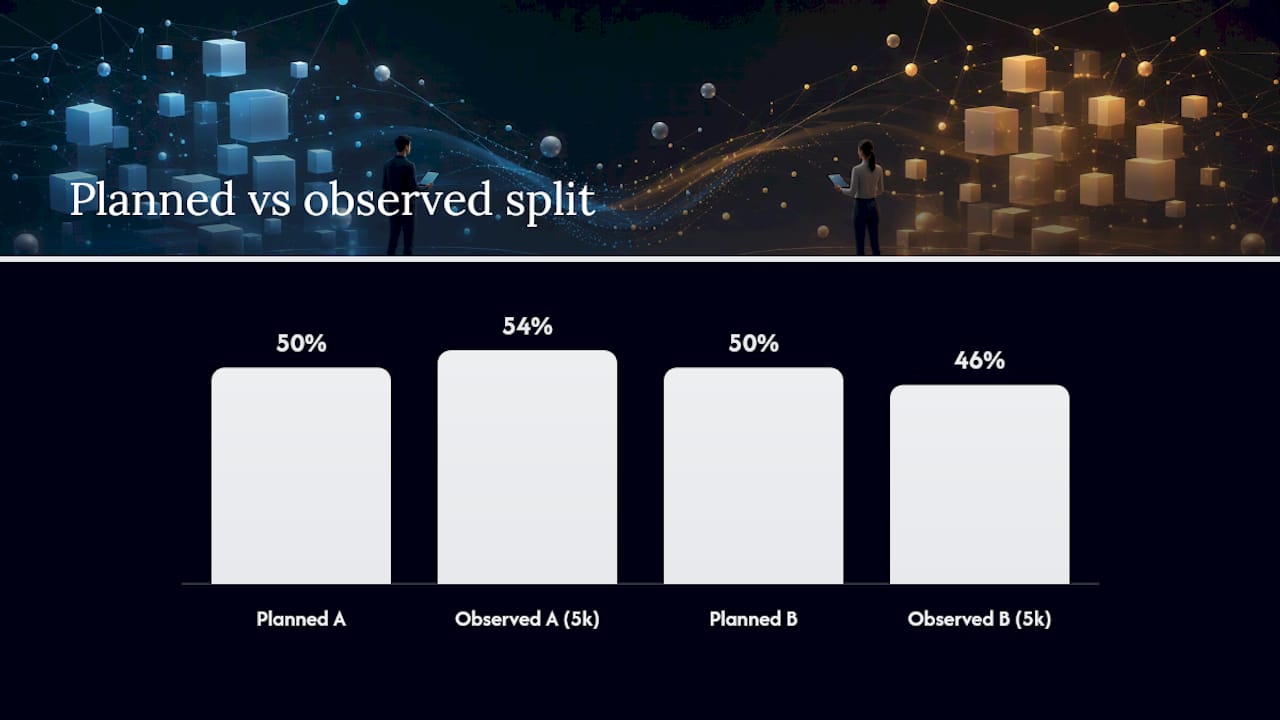
SRM is when your observed assignment split deviates materially from your planned allocation. If you planned a 50/50 split and you're seeing 54/46 after 5,000 visitors, that's a red flag, not noise. Microsoft Research's SRM diagnostics treat this as a reliable early indicator that assignment or instrumentation is broken, not that one variant is performing differently.
A quick chi-square test on your assignment counts will surface SRM. Expected counts come from your planned allocation; observed counts come from your experiment dashboard. A p-value below 0.01 is a hard stop.
- Check assignment counts early in the test, not at the end.
- Common SRM causes: bot traffic, cached pages bypassing assignment, CMP blocking assignment for one segment, or a tag manager firing the SDK conditionally.
- Remediation: pause the test, identify the leakage point, fix it, and restart with a clean assignment window.
Stat to know: Microsoft Research found SRM to be one of the most common failure modes in large-scale A/B testing programs, often caused by instrumentation issues rather than genuine traffic differences.
Pro Tip: Set an SRM alert in your experiment platform to trigger after the first 2,000 assignments. Catching it early saves weeks of invalid data. Connecting this to statistical significance interpretation is the next step once the split is confirmed clean.
Consent management and privacy gating: does tracking honor user choices?
Tracking must not initialize or send exposure or conversion data until consent permits it. That's the rule. Testing only the "accept all" path is the most common audit failure.
Test these four consent states, per Pomelo's tracker audit methodology:
- First visit (no stored choice): No experiment beacons should fire before the CMP prompt resolves.
- Reject all: Zero experiment or analytics requests in the Network tab after rejection.
- Partial accept: Only the categories the user accepted should fire. Experiment tracking typically requires analytics consent.
- Returning visitor (previously accepted): Experiment SDK should initialize on load without re-prompting.
For vendor JS, OWASP recommends verifying Subresource Integrity (SRI) hashes and CORS headers as baseline controls before allowing any third-party script on experiment-critical pages. Confirm your CMP loads before the experiment SDK in the DOM, not after.
Pro Tip: Document each consent scenario as a named test case with expected vs. observed network requests. This gives your privacy team reproducible evidence and keeps your analytics privacy posture audit-ready.
Feasibility review: will this experiment actually answer your question?
Before any script rolls out, confirm three things: the targeted segment exists at scale, the events needed to measure your primary metric are already trackable, and the variant can render without breaking the page.
Short feasibility checklist:
- Audience size: Does the page receive enough traffic to reach statistical significance within your test window? Use a sample-size calculator with your baseline conversion rate.
- Instrumentation completeness: Are all events required for your primary metric already firing reliably? Don't start a test that depends on a new event that hasn't been validated.
- Experiment overlap: Is this page already in another active test? Overlapping experiments contaminate both results.
- Cross-device compatibility: Does the variant render correctly on mobile? Check at least iOS Safari and Android Chrome.
- SEO safety: For split-URL tests, use temporary 302 redirects and confirm the experiment isn't visible to crawlers in a way that triggers cloaking penalties.
HubSpot's A/B testing guide recommends setting sample size and duration before launch, not adjusting them mid-test, which is a feasibility decision, not a monitoring one.
Pro Tip: If any feasibility item is "not ready," escalate it before the script goes live. A test that runs on broken instrumentation wastes the entire traffic window and produces data no one can act on.
Pre-production smoke tests: the runbook to follow before full rollout
Run smoke tests in this order, every time: script presence → exposure beacon → conversion event → CMP gating → SRM sanity check. That sequence catches the most common failures fastest.
Runbook steps:
- Deploy to staging. Confirm script tag is present in page source.
- Open Chrome DevTools → Network. Load the page. Confirm exposure beacon fires with correct variant ID.
- Trigger the primary conversion. Confirm conversion beacon fires with matching variant ID.
- Reject consent. Reload. Confirm zero experiment requests fire.
- Assign 100 test sessions manually (or via your platform's QA mode). Confirm split matches planned allocation.
Sign-off requirements:
- PM signs off on event mapping against the tracking plan.
- Engineer signs off on script load order and console cleanliness.
- QA signs off on cross-browser pass (Chrome + Safari minimum) and CMP gating.
- Evidence collected: HAR file export, annotated screenshots, browser and version recorded.
A blocked failure (script missing, CMP not gating, conversion beacon absent) stops rollout. An acceptable failure (minor payload property missing a non-required field) gets a ticket and a timeline before rollout proceeds.
Vendor JS integrity, monitoring, and contractual controls
Require SRI, CORS compatibility, and contractual code-integrity monitoring before allowing any vendor JS on experiment-critical pages. This isn't optional for long-running tests. OWASP's third-party JS guidance is explicit: security and procurement controls are as important as QA for experiment stability.
Practical controls to implement:
- SRI hashes: Add
integrityandcrossoriginattributes to every vendor script tag. Browsers will refuse to execute a script whose hash doesn't match. - Virtual iframes: Isolate vendor JS in a sandboxed iframe where the experiment logic permits it.
- Vendor change monitoring: Set up alerts for changes to vendor JS files. A silent update can break assignment overnight.
- Periodic pen tests: Include client-side JS in your security review scope, not just server-side endpoints.
| Contract clause | What it covers |
|---|---|
| Code integrity guarantee | Vendor commits to notifying you before any JS changes |
| SRI hash updates | Vendor provides updated hashes with every release |
| Incident response SLA | Defined response time if vendor JS causes a site incident |
| Data processing agreement | Covers experiment data under GDPR/CCPA obligations |
Share this table with procurement before signing any experiment vendor contract.
Typical timeline and effort to verify pages before running tests
A single high-priority page smoke test takes 1–4 hours. A small experiment across 5–10 page templates typically takes 1–3 days. A medium multi-template audit with remediations runs 1–2 weeks.
Effort by role for a small experiment (5 pages):
- PM: 2–4 hours (feasibility review, tracking plan sign-off, stakeholder communication)
- Engineer: 4–8 hours (script integration, data-layer updates, console/network verification)
- QA: 3–6 hours (cross-browser testing, CMP gating, HAR file collection)
- Privacy owner: 1–2 hours (consent scenario review, DPA check)
| Experiment size | Pages | Timeline | Key deliverable |
|---|---|---|---|
| Single page smoke test | 1 | 1–4 hours | Signed-off HAR file and screenshot set |
| Small experiment | 5–10 | 1–3 days | Tracking plan sign-off, QA report |
| Medium multi-template audit | 10–30 | 1–2 weeks | Full audit report with remediation log |
Trackingplan's web audit checklist recommends treating these audits as repeatable processes, not one-off events, which is what drives the timeline down on subsequent runs.
How Gostellar simplifies checking website pages for A/B tests
Gostellar reduces the manual effort across most of the checklist above. Its 5.4KB script loads asynchronously by default, so the script load order and performance checks pass without custom engineering work. The no-code visual editor lets you set up variants without touching the codebase, which removes a common source of script-order errors.
Key capabilities that map directly to this checklist:
- Real-time assignment logging: See variant assignment counts as they accumulate, making early SRM detection straightforward.
- Consent-aware SDK: The script respects CMP signals and won't initialize tracking before consent is granted.
- Advanced goal tracking: Map exposure events to conversion events inside the platform without custom beacon engineering.
- Automated alerts: Get notified when assignment splits deviate or conversion events stop firing.
- Free plan available: Teams with under 25,000 monthly tracked users can run the full verification workflow at no cost.
GDPR, CCPA, and privacy compliance beyond consent management
Consent management is the front door. The rest of the house still needs checking. For experiment instrumentation specifically, GDPR and CCPA compliance requires verifying that experiment data doesn't inadvertently capture or retain disallowed personal data.
Audit these areas beyond the CMP:
- Data minimization: Confirm experiment beacons don't include IP addresses, full URLs with PII query parameters, or device fingerprints not covered by your legal basis.
- Retention limits: Verify your experiment platform's data retention settings match your privacy policy commitments. Raw assignment logs shouldn't persist longer than necessary.
- Data processing agreements: Confirm your experiment vendor has a signed DPA covering the jurisdictions where your users are located.
- CCPA opt-out: For US traffic, confirm the "Do Not Sell or Share My Personal Information" signal (GPC header) is respected by your experiment SDK.
- Cross-border transfers: If experiment data routes through servers outside the EU, confirm Standard Contractual Clauses or equivalent transfer mechanisms are in place.
Document each of these as a named compliance check in your audit runbook, not as a verbal assumption. Privacy teams need written evidence, not assurances.
How to validate dynamic content and SPA page changes
Single Page Applications don't reload the document on navigation, which means your experiment SDK may not re-evaluate targeting rules when a user moves between views. This is one of the most common sources of missed exposures in React, Angular, and Vue applications.
What to verify in an SPA context:
- Route change detection: Confirm your experiment SDK listens for route change events (e.g.,
history.pushState,popstate) and re-evaluates targeting on each navigation. - Exposure event timing: The exposure event should fire after the variant content renders, not on initial SDK load. Inspect the Network tab while navigating between SPA routes.
- Dynamic content injection: If your variant modifies DOM elements that are re-rendered by the framework, confirm the SDK re-applies changes after each render cycle.
- Mutation observer: For frameworks that replace DOM nodes on state changes, a MutationObserver watching the experiment container confirms the variant persists through re-renders.
Test the full user journey in the SPA, not just the entry URL. A variant that applies correctly on /product but disappears after navigating to /cart and back is a real failure that only shows up in session recordings.
How to document and communicate page status to stakeholders
A page's test-readiness status is only useful if the right people can see it without asking. Build a shared status tracker that every stakeholder can read without needing access to DevTools or the experiment platform.
Practical documentation approach:
- Status field per URL: Use a simple label: Ready, In Remediation, Blocked, or Archived. Update it after every audit.
- Evidence links: Attach the HAR file export and screenshot set to each URL row. Stakeholders can verify the evidence without re-running the audit.
- Owner column: Assign a named owner for each blocked item. Unowned blockers don't get fixed.
- Last-audited date: Staleness is a real risk. A page audited three months ago may have changed. Flag anything older than 30 days for re-verification.
- Remediation log: Track what was broken, what was fixed, and when. This becomes your institutional memory for recurring failures.
A shared Notion page, Confluence doc, or even a Google Sheet works. The format matters less than the habit of updating it after every audit cycle. Connecting this to your conversion rate optimization workflow keeps experiment readiness tied to business outcomes, not just technical hygiene.
Automated monitoring and alerting for ongoing instrumentation health
A manual audit is a snapshot. The moment a developer deploys a new tag manager rule or a vendor updates their SDK, that snapshot is stale. Trackingplan's audit methodology makes the case directly: turn periodic audits into continuous monitoring.
What to automate post-deployment:
- Beacon presence monitoring: Set up synthetic monitoring (using tools like Playwright or Puppeteer scripts) that loads your experiment pages on a schedule and confirms exposure beacons fire.
- SRM alerts: Configure your experiment platform to alert when assignment splits deviate beyond a defined threshold within the first 24 hours of a test.
- JS error tracking: Use an error monitoring service to alert on any new errors in the experiment SDK namespace. A silent JS error can break assignment without any visible page failure.
- Vendor script change detection: Monitor the hash of your vendor JS files. An unexpected change triggers an immediate review.
- Event schema validation: Tools that validate incoming event payloads against a defined schema catch missing or renamed properties before they corrupt a full test run.
The website auditing techniques that work best combine scheduled synthetic tests with real-user monitoring, so you catch both infrastructure failures and edge-case user paths.
The case for slowing down before you launch
Most experiment failures I've seen weren't caused by bad hypotheses. They came from pages that looked ready but weren't. The SRM showed up on day three. The CMP was gating correctly in Chrome but not in Safari. The conversion beacon was firing, but without the variant ID, so the data was useless.
The checklist in this guide isn't bureaucracy. It's the difference between a test that produces a decision and one that produces a support ticket. Prioritizing SRM checks, consent gating, and event mapping before launch isn't slowing down experimentation. It's the only way to run experiments that actually tell you something.
Gostellar makes experiment readiness faster for growth teams
Running every check in this guide manually across dozens of pages is a significant time investment. Gostellar cuts that time down by handling the instrumentation layer that most of these checks are verifying.

Its 5.4KB async script passes the performance check out of the box. The consent-aware SDK means CMP gating verification is built into the platform, not a custom engineering task. Real-time assignment logging surfaces SRM signals early, and automated alerts notify your team when event firing breaks post-deployment. The no-code visual editor removes the script-order errors that cause most technical failures in the first place.
Teams with under 25,000 monthly tracked users can start on the free plan and run the full verification workflow before committing to a paid tier. If you're ready to stop auditing pages manually and start running experiments with confidence, try Gostellar and run your first test-readiness check today.
Sources
- Third Party Javascript Management - OWASP Cheat Sheet Series
- A/B testing: a practical guide — HubSpot Blog
- Website tracker audit checklist: cookies, scripts and analytics — Pomelo Analytics
- The Ultimate 10-Point Web Audit Checklist for 2026 | Trackingplan
Recommended
Published: 8/13/2026