
Userfeel Tester: What Marketers Need to Know
TL;DR:
- Userfeel testers are recruited participants who perform goal-oriented tasks and record their experience to reveal usability issues. Small sample sizes, typically five users, uncover most problems, and iterative testing helps teams continuously improve user experience and conversions. Conducting regular usability sessions alongside analytics accelerates fixing friction points and enhances overall website performance.
A Userfeel tester is a real person who performs structured tasks on a website or app while recording their screen and voice, giving product teams direct behavioral evidence of usability problems. This differs from surveys or analytics: you see exactly where users hesitate, click the wrong button, or give up. The Userfeel platform connects businesses with these testers on demand, making remote usability testing accessible without a lab, a moderator, or a long-term subscription. For marketers and product teams, that means faster, cheaper access to the kind of feedback that actually changes decisions.
What is a Userfeel tester and how does the process work?
A Userfeel tester is a recruited participant who completes goal-oriented tasks on a website or app while narrating their experience aloud. The session captures both screen activity and voice, producing a video record that product teams can review at any time. This "think-aloud" method is the gold standard in remote usability testing because it surfaces the gap between what users intend to do and what the interface actually lets them do.
The mechanics are straightforward:
- Session length: Tests range from 5 to 60 minutes, depending on task complexity. Shorter tests suit single-flow evaluations like a checkout or signup. Longer tests cover multistep workflows.
- Tester pay: Testers earn up to $30 per test, with compensation tied to task length and the quality of their verbal feedback.
- Device coverage: Userfeel supports remote testing across desktop, mobile, and tablet, so teams can evaluate responsive designs in real conditions.
- Pricing model: The platform operates pay-as-you-go with no subscriptions, which removes the financial barrier for smaller teams running occasional tests.
- Tester rating system: Testers are rated after each session. Low-rated testers are removed from the panel, which keeps feedback quality high over time.
Tester selection matters as much as the test design itself. Testing with friends or family produces biased results; the platform recruits representative users who match the actual audience profile. That distinction is what separates useful data from comfortable but misleading feedback.
What benefits do marketers and product teams get from real-user feedback?

Real-user feedback from a usability session reveals behavior, not opinion. A user might say they "love" a page in a survey while the session video shows them spending 45 seconds hunting for the call-to-action button. Behavior is the signal; opinions are noise. That behavioral record is what makes Userfeel's approach so useful for teams trying to fix conversion problems.
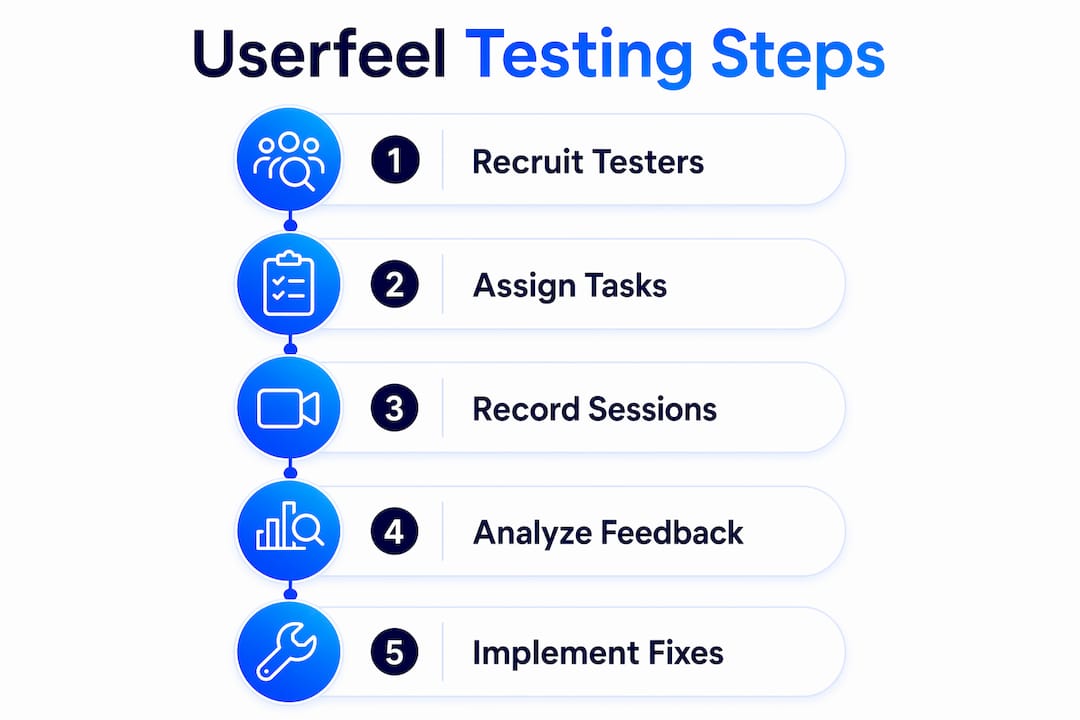
The business case for this kind of testing is strong. Testing with just 5 users uncovers roughly 85% of usability issues, and the return on investment from small-sample usability testing can reach near 9,900%. That figure reflects the cost of fixing a problem before launch versus after, when engineering time, lost conversions, and customer support costs compound.
Specific benefits for marketing and product teams include:
- Friction identification: Session recordings show exactly where users drop off, hesitate, or misread interface elements. This is more specific than a bounce rate.
- Prioritization support: When multiple users struggle with the same step, the frequency and severity of the issue become clear. Teams can rank fixes by impact rather than guessing.
- Verbatim language capture: User quotes from sessions give stakeholders concrete evidence for design changes. "I couldn't find the price" lands harder in a product review than "users have trouble locating pricing information."
- Conversion rate improvement: Fixing the friction points that session recordings expose directly reduces abandonment and improves task completion rates.
- User experience in SEO: Improved usability signals, like lower bounce rates and longer session times, also support organic search performance.
Pro Tip: Run a test on your highest-traffic landing page first. That is where usability friction costs the most in lost conversions, and it is the fastest place to demonstrate ROI to stakeholders.
What are best practices for running effective usability tests?
Good test design determines whether you get clear data or ambiguous noise. The methodology matters as much as the number of sessions you run.
Write tasks that reflect real goals
Tasks should describe a realistic goal, not a step-by-step instruction. "Find a plan that fits a team of 10 and start a free trial" is a good task. "Click the Pricing tab, then select the Team plan" is not. The second version tells the user what to do, which eliminates the usability signal you are trying to capture.
Use structured questions and measurement scales
Effective usability testing uses task-based scenarios and quantitative measures like the Single Ease Question (SEQ), a 1–7 scale where users rate how difficult a task felt immediately after completing it. Pairing behavioral observation with a consistent scale lets teams compare results across multiple test rounds.
Let testers struggle
Moderators must avoid giving hints when a tester gets stuck. The struggle is the data. A tester who cannot find the navigation menu without help reveals a real usability problem. A tester who receives a hint reveals nothing. This applies to both live-moderated and self-recorded sessions.
- Write one task per core flow. Mixing signup and checkout into one session produces muddled data. Test one flow at a time.
- Avoid leading questions. "Did you find the checkout confusing?" primes a yes. "How did that feel?" does not.
- Recruit outside your network. Representative users, not friends or colleagues, produce unbiased results.
- Review recordings with your team. Watching sessions together aligns product and marketing on what users actually experience, not what the team assumes.
- Document verbatim quotes. Exact user language, captured during the session, is the most persuasive evidence you can bring to a design review.
Pro Tip: Focus your first test on a single core flow, like signup or checkout. Focused single-flow tests produce clearer, more actionable data than broad site evaluations.
How does Userfeel testing fit into a broader UX and marketing workflow?
Userfeel testing does not replace analytics or A/B testing. It works alongside them. Analytics tells you that 60% of users abandon a form. A session recording tells you why: the error message appears in a color that users do not notice. Those two data points together give you a fix worth testing.
Pair usability findings with A/B testing
Once a session recording reveals a specific friction point, an A/B test can validate the fix at scale. For example, if testers consistently miss a call-to-action button, you can test a higher-contrast version against the original. A/B testing for landing pages becomes far more targeted when usability research defines the hypothesis. Without that research, A/B tests often measure the wrong variable.
Test early to reduce costs
Running usability tests earlier in the design lifecycle reduces expensive post-launch fixes. A problem caught in a prototype stage costs a fraction of what it costs after a full build. Teams that wait until launch to test usability consistently face higher engineering costs and slower iteration cycles.
Use iterative rounds with small samples
Small qualitative samples remain highly effective for identifying usability problems. Large samples offer diminishing returns in qualitative research; the goal is pattern recognition, not statistical significance. Running three to five rounds of five users each, spaced across a design cycle, produces continuous improvement without large budgets.
The table below shows how usability testing fits different stages of a product or campaign cycle:
| Stage | Testing focus | What you learn |
|---|---|---|
| Pre-launch prototype | Core navigation and task flows | Where the design breaks before build |
| Post-launch landing page | Conversion path friction | Why users abandon before converting |
| Redesign validation | Comparison of old vs. new flows | Whether the fix actually helped |
| Ongoing optimization | Specific feature or content areas | Where to prioritize next iteration |
Pro Tip: Link usability findings directly to a business metric, like bounce rate or form completion rate, before presenting to leadership. Numbers give your qualitative data organizational weight.
Integrating Userfeel findings with landing page performance data creates a feedback loop where behavioral evidence drives design changes, and those changes are measured in conversion outcomes. That loop is what separates teams that improve steadily from teams that redesign by committee.
Key Takeaways
Remote usability testing with real users is the most direct way to identify what breaks conversion and why, and small samples of five users consistently surface the majority of problems.
| Point | Details |
|---|---|
| Small samples, big returns | Five users uncover roughly 85% of usability issues, making large panels unnecessary for most tests. |
| Behavior beats opinion | Session recordings reveal what users actually do, not what they say they would do in a survey. |
| Test one flow at a time | Focused tests on a single flow like checkout or signup produce clearer, more usable data. |
| Early testing cuts costs | Running tests before launch reduces expensive post-launch fixes and aligns builds with real user needs. |
| Pair with A/B testing | Usability findings sharpen A/B test hypotheses, making experiments faster to design and easier to interpret. |
Why I think most teams misuse usability testing
Most teams treat usability testing as a one-time audit. They run five sessions before a launch, fix the obvious problems, and move on. That approach misses the compounding value of iterative testing.
The teams I have seen get the most out of a user experience tester setup are the ones who treat it as a recurring practice, not a project milestone. They run short tests on specific flows every few weeks. They watch recordings together as a team, not just as a UX function. And they resist the urge to guide testers when things go wrong on screen. That last part is harder than it sounds. Watching a user struggle with something you built is uncomfortable. But that discomfort is the data.
The other mistake I see constantly: teams collect verbatim quotes and then bury them in a research report nobody reads. The most effective use of user language is in the room where decisions get made. Put the quote on the slide. Play the clip. Let the user's voice make the case for the fix.
Usability testing only changes organizations when the findings reach the people with authority to act. Getting there requires treating session data as evidence, not just research.
— Juan
How Gostellar helps you act on usability insights

Identifying friction through a website usability tester session is only half the work. The other half is testing fixes at scale. Gostellar's A/B testing platform gives marketers and product teams the tools to validate changes quickly, without writing code. With a 5.4KB script that does not slow your site, a no-code visual editor, and real-time analytics, Gostellar connects directly to the workflow where usability findings become measurable improvements. If you are already running usability sessions and want to turn those insights into conversion gains, start with Gostellar and run your first experiment in minutes.
FAQ
What is a Userfeel tester?
A Userfeel tester is a recruited participant who completes structured tasks on a website or app while recording their screen and narrating their experience aloud. Teams use these recordings to identify usability problems they cannot see in analytics alone.
How much do Userfeel testers get paid?
Testers earn up to $30 per session, with pay varying based on task length and the quality of verbal feedback provided during the recording.
How many testers do I need for useful results?
Five users per test round uncovers roughly 85% of usability issues. Running more than five users in a single round produces diminishing returns for qualitative research.
Can Userfeel testing work on mobile devices?
Userfeel supports remote usability testing on desktop, mobile, and tablet devices, so teams can evaluate how their site or app performs across different screen sizes and contexts.
How does usability testing connect to conversion rate improvement?
Session recordings reveal the specific friction points that cause users to abandon a flow. Fixing those points directly improves task completion rates, which translates to higher conversion rates on landing pages and checkout flows.
Recommended
Published: 7/11/2026