
Userlytics Tester: What Marketers Need to Know
TL;DR:
- A Userlytics tester is a paid remote participant who records usability tests through screen, voice, and webcam recordings. Test payments range from $5 to $90, with earnings influenced by response speed and feedback quality. Success depends on technical readiness, clear narration, and timely responses, making it a reliable supplemental income source.
A Userlytics tester is a paid remote participant who records their screen, voice, and webcam reactions while navigating websites, apps, or prototypes so that product teams receive real behavioral data instead of survey guesses. The platform, founded in 2009, sits at the intersection of UX research and side income, making it relevant to both the researchers who commission studies and the participants who run them. For marketers and UX teams, understanding how the tester side works is the fastest way to design better studies, recruit the right participants, and interpret results with confidence. This guide covers platform requirements, compensation, quality standards, and the limitations you need to know before building Userlytics into your research workflow.
What is a Userlytics tester and how does the platform work?
A Userlytics tester is a remote usability tester who completes structured tasks on a digital product while narrating their thoughts aloud. The industry standard term for this role is "UX research participant," and the two labels are used interchangeably throughout the platform. Userlytics records the tester's screen, microphone audio, and webcam feed simultaneously, giving researchers a three-channel view of real user behavior.
The platform supports several test formats that go well beyond simple click-through tasks. Card sorting asks testers to group content into categories that feel logical to them. Tree testing checks whether a site's navigation structure makes sense. User journey tests walk participants through multi-step flows like checkout or onboarding. Each format captures a different layer of usability data, and test type variety gives testers opportunities to specialize and build a stronger track record over time.
Technical requirements for testers
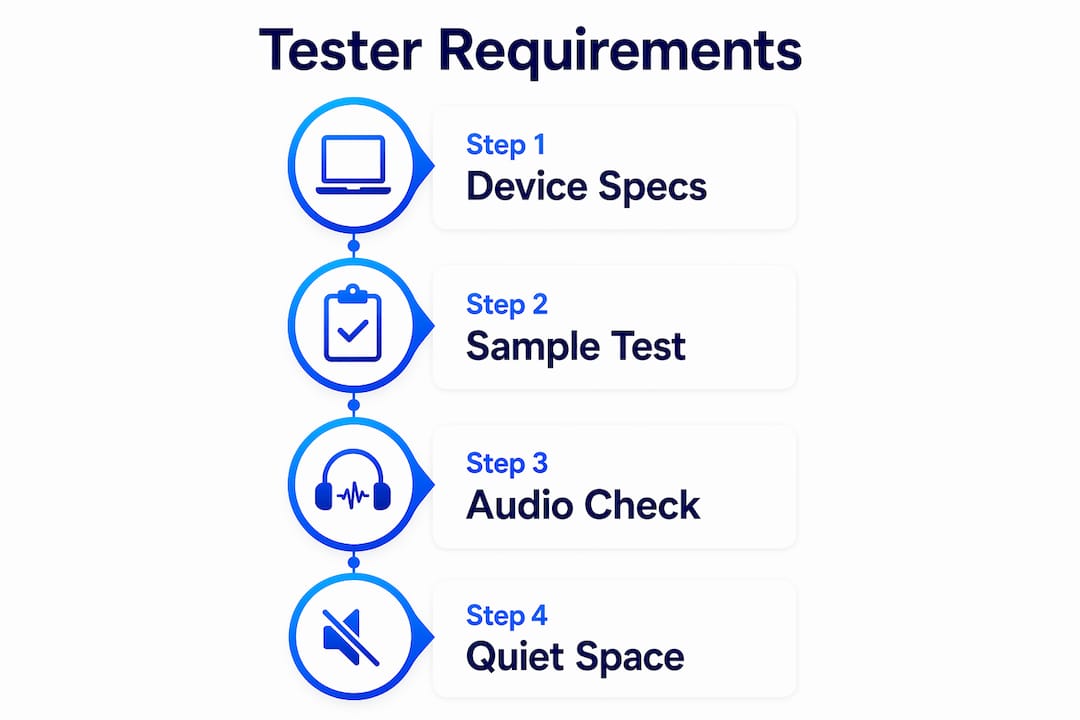
Participation requires a device that meets minimum specs. Desktop testers need Windows 7 or later, or macOS 10.13 or later. Mobile testers need Android Lollipop or iOS 11 at minimum. Every device must have a working microphone, a webcam, and a stable internet connection capable of uploading video files without interruption.
The signup process does not require a formal qualification exam, but every new tester must pass a sample test. That sample evaluates audio clarity, video quality, and the ability to think aloud coherently. Userlytics accepts 30–40% of applicants globally, including testers in North America, Europe, South Africa, and Southeast Asia. Demographic targeting by clients means that not every accepted tester receives the same volume of invitations.
Pro Tip: Test your microphone and webcam in a quiet room before recording your sample test. Background noise is the most common reason applications get rejected, and you only get one first impression.
How much does a Userlytics tester earn?
Userlytics pays $5–$20 per standard test, with specialized or longer studies paying up to $90. Tests typically run 20–40 minutes, which puts the effective hourly rate between $15 and $30 for standard work. Specialized tests that require specific professional backgrounds or technical knowledge command the higher end of that range.

Payment arrives via PayPal on a 15-day cycle after client approval. There is no minimum cashout threshold, so even a single completed test triggers a payment once approved. The 15-day window exists because clients review recordings before releasing funds, not because the platform holds money arbitrarily.
Earnings potential by test type
| Test type | Typical pay | Estimated duration |
|---|---|---|
| Standard usability test | $5–$20 | 20–40 minutes |
| Specialized or expert test | Up to $90 | 30–60 minutes |
| Card sorting or tree test | $5–$15 | 10–20 minutes |
| Multi-session user journey | $20–$50 | 45–90 minutes |
Monthly earnings depend entirely on test availability, which fluctuates based on client demand and your demographic profile. Userlytics is considered supplemental income rather than a primary revenue source, and that framing is accurate. A tester in a high-demand demographic in North America or Western Europe might complete several tests per week. A tester in a lower-demand region might see only a few per month.
Pro Tip: Complete every invited test promptly. Clients often release a batch of invitations and fill slots on a first-come, first-served basis. Slow response means missed income.
For marketers who want to understand the earning side of website testing, knowing the pay structure also clarifies what motivates your testers and how to design studies that attract high-quality participants.
How do you excel as a Userlytics tester?
Delivering quality feedback is the single factor that separates testers who receive frequent invitations from those who go weeks without one. The platform's reputation system rewards testers whose recordings are useful to clients, and clients signal usefulness by approving tests quickly and requesting similar participants again.
The think-aloud method is the core skill. Quality verbal feedback identifies usability bottlenecks that click data alone cannot reveal. A tester who says "I expected the checkout button to be at the top of the page, not buried below the product description" gives a designer a specific, fixable problem. A tester who silently clicks through and says "it was fine" gives the client nothing.
- Narrate continuously. Silence during a recording is the fastest way to get a test rejected. Describe what you see, what you expect, and what confuses you, even when the task feels straightforward.
- Be specific, not polite. Clients pay for honest reactions, not flattery. If a navigation menu is confusing, say so and explain why.
- Follow task instructions exactly. Deviating from the assigned scenario, even with good intentions, can result in a rejected recording and no payment.
- Check your setup before every session. Confirm your microphone is active, your webcam is recording, and your browser has the necessary permissions. A failed recording due to a muted mic is a wasted 30 minutes.
- Treat the sample test like a paid job. Top-tier tester status depends on the quality of your recordings and your think-aloud narration. The sample test sets your baseline reputation on the platform.
Pro Tip: Record a practice run on your own before your first real test. Play it back and count how many seconds pass without you speaking. Any gap longer than five seconds is a red flag for clients.
Think-aloud testing captures genuine behavioral insights and emotional reactions that surveys cannot replicate. That distinction matters for researchers: the data you get from a well-coached tester is qualitatively different from a five-point rating scale. For a deeper look at structuring these studies, the web usability test guide from Gostellar covers practical frameworks for UX teams.
What challenges do Userlytics testers face?
Test availability is the most common frustration. Userlytics does not guarantee a minimum number of tests per week or month. Availability depends on which clients are running studies, what demographics they need, and how many testers fit those criteria. Testers in North America and Western Europe receive more frequent invitations because most clients target those markets, but even high-demand testers experience dry spells.
Mobile testing introduces a separate layer of technical risk. Upload errors, OS incompatibilities, and data usage issues are common enough that testers routinely underestimate the troubleshooting involved. A failed upload after a 40-minute session means no payment and no recourse. Desktop testing is more reliable for this reason.
Other limitations worth knowing:
- Screening rejections are normal. Clients screen testers before each study based on demographics, device type, and prior experience. Passing the initial signup does not guarantee acceptance into any specific test.
- Payment delays are built into the process. The 15-day approval window can extend if a client takes longer to review recordings. There is no mechanism to accelerate this.
- Regional gaps are real. Testers outside North America and Western Europe may find the platform less productive as a side income source, though the international client base does create some opportunities globally.
- Success requires professionalism. Remote testing rewards technical preparedness and communication quality, not just availability. Testers who treat it casually earn less and receive fewer invitations over time.
The practical solution is to treat Userlytics as one source within a broader income or research strategy, not the only one. Pairing it with other platforms or income streams smooths out the gaps in test availability and reduces the financial risk of a slow month.
Key Takeaways
A Userlytics tester delivers the most value, and earns the most, by combining technical reliability with consistent, specific think-aloud narration on every recording.
| Point | Details |
|---|---|
| Tester pay range | Standard tests pay $5–$20; specialized tests pay up to $90 via PayPal every 15 days. |
| Acceptance rate | Userlytics accepts 30–40% of applicants globally, with higher availability in North America and Western Europe. |
| Think-aloud quality | Specific verbal feedback identifying usability problems is the primary factor in test approval and future invitations. |
| Technical readiness | Desktop testing on Windows 7+/macOS 10.13+ is more reliable than mobile; always verify mic and webcam before recording. |
| Income expectations | Userlytics is supplemental income; inconsistent test availability makes it unsuitable as a sole revenue source. |
What I've learned from watching testers work
The biggest mistake researchers make with Userlytics is treating tester feedback as raw data that speaks for itself. It does not. A tester who says "this is confusing" without explaining what specifically confused them has given you a sentiment, not an insight. The real value comes from the moment a tester pauses, backtracks, and narrates exactly why they expected something different. That moment is what justifies the cost of the study.
I've also noticed that researchers who brief their study design carefully get dramatically better recordings. When task instructions are ambiguous, testers fill the gap with assumptions, and those assumptions contaminate the data. The user experience design principles that apply to your product apply equally to your test design. Clarity in the task prompt produces clarity in the feedback.
One more thing: the 4.5-star Trustpilot rating with 350+ verified reviews tells you the platform is legitimate, but it does not tell you whether the testers in your study are the right fit for your product. Demographic targeting is a starting point, not a guarantee of relevance. The researchers who get the most from Userlytics are the ones who screen carefully, write precise tasks, and watch recordings with a specific research question in mind rather than hoping something interesting surfaces.
— Juan
How Gostellar helps you act on usability data
User testing surfaces the problems. What you do with that data determines whether your product actually improves.

Gostellar's A/B testing platform lets you take the friction points identified in usability studies and test specific fixes directly on your live site. With a no-code visual editor, real-time analytics, and a 5.4KB script that does not slow your pages down, you can move from research insight to validated change without waiting on a development sprint. The user experience optimization guide from Gostellar walks through how to connect qualitative research findings to quantifiable conversion experiments. Gostellar offers a free plan for sites under 25,000 monthly tracked users, making it accessible for teams at any stage. Visit gostellar.app to see how it fits your workflow.
FAQ
What is a Userlytics tester?
A Userlytics tester is a paid remote participant who completes usability tasks on websites or apps while recording their screen, voice, and webcam. Clients use these recordings to identify friction points in their digital products.
How much do Userlytics testers get paid?
Standard tests pay $5–$20, and specialized tests pay up to $90. Payments are sent via PayPal on a 15-day cycle after client approval, with no minimum cashout threshold.
What are the technical requirements to become a tester?
Desktop testers need Windows 7+ or macOS 10.13+, plus a working microphone and webcam. Mobile testers need Android Lollipop+ or iOS 11+, and all testers need a stable internet connection for video uploads.
How do you increase test invitations on Userlytics?
Consistently delivering clear, specific think-aloud narration improves your tester reputation and increases the frequency of invitations. Completing tests promptly and maintaining clean audio and video quality are the two most direct factors.
Is Userlytics a reliable source of income?
Userlytics is best treated as supplemental income. Test availability is inconsistent, and monthly earnings depend heavily on your demographic profile and regional demand from clients.
Recommended
Published: 7/8/2026