
UX Testing for Product Teams: A Practical Guide
TL;DR:
- UX testing involves observing real users completing tasks to identify usability issues before they impact conversions or engagement. It relies on realistic scenarios, disciplined observation, and analyzing patterns to prioritize design improvements efficiently. Consistent, iterative testing with small participant groups can significantly enhance product usability and decision-making.
UX testing is defined as the practice of observing real users complete representative tasks on a product or interface to identify usability problems before they cost you conversions or users. The industry standard term is usability testing, and the two are used interchangeably across teams at Digital.gov, GitLab, and Nielsen Norman Group. Moderated sessions typically run 20 minutes to 1 hour, giving you enough time to surface meaningful friction without exhausting participants. For product managers, UX designers, and developers, this practice is the most direct path from assumption to evidence.
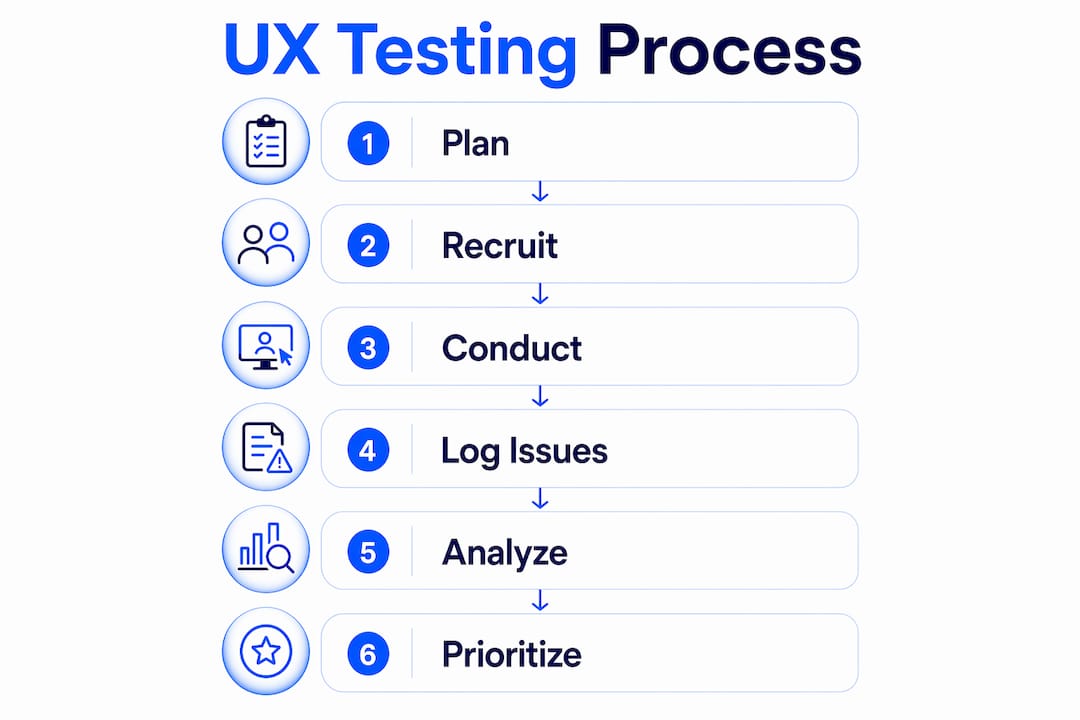
What is UX testing and how does it work?
UX testing works by placing a real user in front of your product, giving them a realistic task, and watching what happens without intervening. The user thinks out loud while a moderator listens and a team of observers records what breaks down. This structure, recommended by Digital.gov and practiced at organizations like GitLab, separates opinion from observation.
The moderator's job is to keep the session moving without leading the participant. Observers stay silent and maintain a rolling issues log tied to each task and user. That log becomes your primary analysis tool after the session ends.
Sessions cover a defined set of scenarios, not open-ended exploration. Each scenario mirrors a real task your users perform, such as completing a checkout flow, finding a support article, or configuring account settings. The more realistic the scenario, the more reliable the data.
How to plan and run effective usability testing sessions
Good sessions are built before anyone sits down at a screen. Planning covers four areas: scenarios, roles, logistics, and observation protocols.
Build scenarios around real product goals
Scenarios must reflect tasks your actual users perform. Pull them from support tickets, analytics drop-off points, or product roadmap priorities. A scenario like "Find and update your billing address" is testable. "Explore the app" is not.
Write each scenario as a brief story that gives context without revealing the answer. Tell the participant they just received an invoice with the wrong address. Ask them to fix it. That framing produces realistic behavior.
Assign roles before the session starts
Every session needs at minimum two people: a moderator and at least one observer. The moderator runs the think-aloud protocol, prompting the user with neutral questions like "What are you thinking right now?" Observers watch and record. They never speak to the participant directly.

Observers relay questions only to the moderator during the session, typically through a shared chat channel or a sticky note passed quietly. This keeps the participant's behavior uncontaminated by multiple voices or competing instructions.
Use a rolling issues log throughout
The rolling issues log is a shared document where observers record problems as they happen, tied to the specific user and task. Building this log iteratively during multi-observer studies prevents lost observations and builds team consensus without a lengthy debrief. After five sessions, patterns become obvious.
Pro Tip: Set up the rolling log as a shared spreadsheet before the first session. Columns for user ID, task number, observation, and severity let you sort and prioritize findings in minutes after testing ends.
What are the main types of usability tests?
The right test type depends entirely on where you are in the product lifecycle. Using a summative test on a rough prototype wastes time. Running a lightweight formative test on a live product misses the rigor you need for stakeholder decisions.
Formative vs. summative testing
Formative testing suits early prototypes and ongoing design iteration. Sessions are small, fast, and focused on discovering problems. Summative testing validates a live product against defined benchmarks. It requires larger samples and more structured metrics.
GitLab treats formative testing as continuous and lightweight, running it alongside sprints. Summative testing happens at defined release milestones to confirm that changes actually improved usability.
Prototype testing
Prototypes can be static wireframes or interactive mockups, typically taking 2–4 hours to build for a usability session. Static prototypes test navigation logic and information architecture. Interactive prototypes test task flows and micro-interactions. Both are valid. The choice depends on what question you need answered.
Usability benchmarking
Benchmarking is a metrics-driven study using roughly 20 participants and 25 tasks. It produces trend data you can track over multiple releases. Think of it as a repeatable measurement program, not a one-time audit. GitLab runs benchmarking studies to compare performance before and after major redesigns.
Comparison of UX testing methods
| Method | Sample Size | Time Required | Best For |
|---|---|---|---|
| Formative usability test | 5–8 users | 1–2 days | Early design discovery |
| Summative usability test | 10–20 users | 1–2 weeks | Live product validation |
| Prototype test | 5–8 users | 2–4 hours setup | Flow and navigation testing |
| Usability benchmarking | ~20 users, ~25 tasks | 2–4 weeks | Trend tracking over releases |
| Multivariate testing | Large traffic sample | 1–4 weeks | Quantitative conversion optimization |
Pro Tip: Match your test type to your product stage. Formative tests during design sprints catch problems cheaply. Summative tests before a major launch confirm you solved them.
For a deeper look at how multivariate testing fits alongside qualitative usability work, the Gostellar blog covers the mechanics in detail.
How do you recruit the right test participants?
Participant quality determines result quality. A test with five perfectly matched users beats a test with twenty convenience recruits every time.
Who to recruit
Recruit participants who are current, recent, or similar users of your product or a comparable one. For a B2B project management tool, that means project managers or team leads, not general office workers. The closer the match, the more realistic the behavior you observe.
Avoid recruiting friends, colleagues, or anyone who already knows your product well. Familiarity masks the friction that new users hit immediately.
Where to find participants
- User communities and forums: Reddit communities, Slack groups, and LinkedIn groups tied to your product category
- Customer databases: Filter by recency and usage frequency, then reach out directly
- Recruitment services: Platforms that maintain panels of pre-screened participants for specific industries
- Social media outreach: Targeted posts in professional groups, especially for niche B2B products
Plan 1–2 weeks for recruiting up to nine participants. Rushing recruitment produces poor matches and last-minute cancellations.
How many users do you need?
Five users uncover roughly 85% of usability problems in a single test round. This is Nielsen's five-user rule, and it holds because usability problems tend to be systemic. The sixth user starts repeating what the first five already showed you. That said, if your product serves two distinct user groups, test five from each group separately.
Pro Tip: Maintain diversity in your participant pool across experience levels, device types, and demographics relevant to your product. A checkout flow that works for desktop power users may completely fail for mobile-first first-time buyers.
How do you analyze and act on UX testing results?
Raw observations are not findings. Findings are patterns tied to specific interface problems with a clear recommendation attached.
Build your analysis from the rolling log
Start with the rolling issues log from your sessions. Group observations by task and by frequency. A problem that appeared in four out of five sessions is a critical finding. One that appeared once is worth noting but not prioritizing above the systemic issues.
Quantitative indicators add weight to your qualitative observations. Track task success rates, time on task, and satisfaction scores from a post-session survey. A task with a 40% success rate and high time-on-task is a redesign priority regardless of how good the interface looks.
Frame output as prioritized recommendations
Frame usability findings as prioritized design changes rather than a traditional research report. A report gets read once and filed. A prioritized list of interface changes with supporting evidence gets acted on. Each recommendation should name the problem, show the evidence, and suggest a direction for the fix.
- Identify the pattern. Group observations from the rolling log by task and issue type.
- Assign severity. Rate each issue by frequency and impact on task completion.
- Write the recommendation. One sentence describing the interface change needed.
- Attach the evidence. Link to session notes, timestamps, or direct quotes from participants.
- Present to stakeholders. Use the prioritized list as the agenda for your design review meeting.
Linking findings to prioritized interface changes improves team decision speed and reduces the back-and-forth that stalls redesign cycles.
Pro Tip: Run iterative tests after implementing fixes. A second round with five new users confirms whether the redesign solved the problem or introduced a new one. Treat usability benchmarking as an ongoing program, not a one-time event.
Key takeaways
Effective UX testing requires representative participants, realistic scenarios, disciplined observation, and findings framed as prioritized design changes rather than research reports.
| Point | Details |
|---|---|
| Start with realistic scenarios | Base tasks on real user goals pulled from analytics or support data. |
| Five users is usually enough | Nielsen's rule holds: five participants surface roughly 85% of usability problems per round. |
| Match test type to product stage | Use formative tests during design and summative tests to validate live products. |
| Build a rolling issues log | Record observations in real time to prevent lost data and speed up analysis. |
| Frame findings as design changes | Prioritized recommendations get acted on faster than traditional research reports. |
What running hundreds of UX sessions taught me
Most teams underinvest in facilitation and overinvest in recruiting. They spend two weeks finding the perfect participants, then put an unprepared moderator in the room who leads every answer with "Does that make sense?" That single phrase invalidates the session. The participant stops exploring and starts performing.
The hardest skill in usability testing is staying quiet. Every instinct tells you to help when a user struggles. Helping destroys the data. The struggle is the data.
I have also seen teams treat usability testing as a one-time gate before launch rather than a continuous practice. That approach produces a single data point. Iterative testing, even with just five users per round, builds a trend line. You stop guessing whether the redesign worked and start measuring it.
Resource constraints are real. Not every team can run weekly sessions. But even one round of five users every sprint cycle changes how a team makes decisions. The website usability testing process does not need to be expensive or elaborate to be effective. It needs to be consistent.
The teams that get the most value from usability testing are the ones who treat it as a workflow, not a project. They have templates ready, a participant pool they maintain, and a standing meeting where findings get reviewed. That infrastructure is what separates teams that learn from users from teams that argue about them.
— Juan
How Gostellar fits into your testing workflow
Once your usability testing surfaces the interface changes worth making, you need a way to validate those changes at scale before committing to a full rollout.

Gostellar is built for exactly that moment. The platform's no-code visual editor lets product managers and UX designers set up A/B tests on redesigned flows without writing a line of code. Real-time analytics show you whether the new design actually improves task completion and conversion rates. For teams running iterative usability cycles, Gostellar connects qualitative findings to quantitative proof. Explore what Gostellar's testing platform can do for your product optimization workflow.
FAQ
What is the definition of usability testing?
Usability testing is the practice of observing real users complete specific tasks on a product to identify where the interface causes confusion, errors, or failure. The goal is to surface problems before they affect the full user base.
How many users do you need for a usability test?
Five users are enough to uncover roughly 85% of usability problems in a single test round, based on Nielsen's five-user rule. If your product serves two distinct user groups, test five participants from each group separately.
What is the difference between formative and summative usability testing?
Formative testing happens during design to discover problems early, using small samples and lightweight methods. Summative testing validates a live product against defined benchmarks using larger samples and structured metrics.
How long does a usability test session take?
Moderated usability sessions typically run 20 minutes to 1 hour per participant, depending on the number of tasks and the complexity of the product being tested.
What is a rolling issues log in UX testing?
A rolling issues log is a shared document where observers record usability problems in real time during sessions, tied to specific users and tasks. It prevents lost observations and speeds up post-session analysis by building consensus as the study progresses.
Recommended
Published: 6/12/2026