
SMBs: Free Web Health Check on Top 3–5 Pages in Under an Hour
Run PageSpeed Insights right now on your three most important pages. It's free, takes about 30 seconds per page, and hands you a Core Web Vitals snapshot along with a prioritized list of fixes. If it flags critical issues or you manage more than a handful of pages, escalate to a full crawl with Semrush Site Audit or Ahrefs Site Audit, or set up continuous monitoring so the next regression doesn't slip past you.
TL;DR:
- Running PageSpeed Insights on your top pages reveals critical performance issues related to Largest Contentful Paint and Cumulative Layout Shift that can impact user experience.
- Use a crawler like Semrush or Ahrefs for a full-site audit, especially if systemic problems across many pages are suspected, as they organize errors by severity with actionable fixes.
- Regularly check SSL certificates, security headers, and broken assets using quick, free tools to prevent common vulnerabilities and silent failures post-deployment.
- Focus on issues that directly affect revenue by prioritizing page speed for transaction pages or indexability for high-traffic content, aligning fixes with specific business goals.
- Validate the actual business impact of fixes with real-browser testing and live analytics to confirm improvements in conversions rather than relying solely on lab scores.
Table of Contents
- What Is a Web Health Check and Which Tool Do You Need?
- How Do You Pick the Right Web Health Check for Your Site?
- How Do I Run a Free Web Health Check Step by Step?
- What Do Core Web Vitals and Lab vs Field Data Actually Mean?
- How Often Should You Run a Web Health Check?
- What Does a Full Web Health Check Actually Cost?
- How Do Professional Web Health Check Services Compare to DIY Tools?
- Do Regular Web Health Checks Actually Move Revenue?
- What Business Goals Should Shape Your Web Health Check?
- How Do You Turn Health Check Results Into Business Impact?
- What Small Sites Get Wrong Most Often
- An Adjacent Way to Validate Every Fix You Ship
- Tools and Docs Worth Bookmarking
- Sources
- FAQ
What Is a Web Health Check and Which Tool Do You Need?
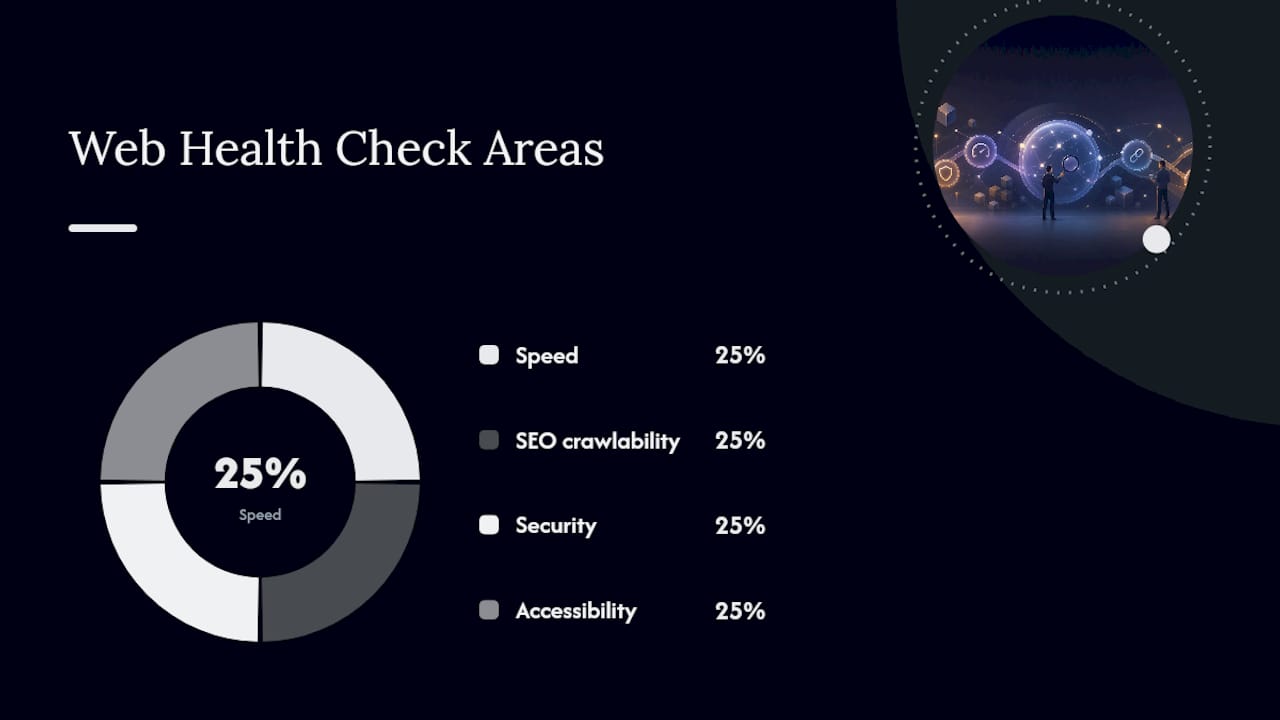
A web health check is a structured look at how your site performs across four areas that actually move business outcomes: speed, SEO crawlability, security, and accessibility. The tool you need depends on how much of your site you're checking and how often.
For a single page or a handful of landing pages, PageSpeed Insights is the fastest entry point. It runs a Lighthouse audit in your browser and layers in real-world CrUX field data when your site has enough traffic to qualify. For a full site with dozens or hundreds of pages, you need a crawler. That's where Semrush Site Audit and Ahrefs Site Audit come in, each scanning every page and organizing what they find into severity tiers instead of one long undifferentiated list.
Then there's a third category: integrity and scorecard tools. A Sitewatch-style integrity checker looks for things Lighthouse doesn't catch, like expired SSL certificates, mixed content warnings, and broken assets that fail silently after a deploy. A Nitro-style scorecard takes a different approach entirely, running several checks at once and compressing the results into A through F letter grades so a non-technical manager can read it in ten seconds.
| Tool | Scope | Free or Paid | Output Format | Monitoring | Best For |
|---|---|---|---|---|---|
| PageSpeed Insights | Performance, Core Web Vitals | Free | Score + audit list | No | Instant page-level triage |
| Semrush Site Audit | SEO, some performance | Free snapshot, paid for full crawl | Score + prioritized fix list | Yes, scheduled scans | Full-site SEO and recurring audits |
| Ahrefs Site Audit | SEO (170+ checks) | Paid (limited free crawl) | Prioritized list by error/warning/notice | Yes | Deep technical SEO crawls |
| Sitewatch-style integrity checker | Security, uptime, broken assets | Free quick scan | Report card | Limited | Fast post-deploy regression checks |
| Nitro-style scorecard | SEO, speed, security, meta | Free | A-F grades | No | Executive-level overview |
A few things worth knowing before you pick one:
- PageSpeed Insights measures one URL at a time; it won't tell you if your other 200 pages have the same problem.
- Ahrefs Site Audit scans for more than 170 technical and on-page issues and groups them by severity with fix instructions attached.
- Semrush's Site Audit starts with an instant snapshot, then unlocks scheduled recurring crawls and trend tracking once you're on a paid plan.
- Scorecard tools trade depth for speed. Great for a Monday-morning gut check, not a substitute for a real crawl.
The methodology behind these tools matters more than most people realize. Lighthouse-based tools simulate a page load under controlled lab conditions. CrUX field data reflects what actually happened to real visitors over the past 28 days. A CDP (Chrome DevTools Protocol) real-browser audit goes a step further, capturing an actual waterfall and filmstrip of the page loading in a live Chromium session. Each answers a different question, and mixing them up is how teams chase the wrong fix.
How Do You Pick the Right Web Health Check for Your Site?
Start with what you're actually trying to solve, not which tool has the best marketing page. A one-page landing site has different needs than a 500-page e-commerce catalog.
- Match scope to the problem. If you suspect one page is slow, run a single Lighthouse audit. If you suspect systemic issues across your whole domain, you need a crawler like Semrush Site Audit or Ahrefs Site Audit.
- Check what the output actually gives you. A tool that just spits out a score without prioritized fixes and reproducible steps wastes your developer's time. Look for severity tiers (critical, warning, notice) and specific page examples.
- Budget for time, not just money. Free tools cost nothing upfront but eat developer hours interpreting raw output. Paid tools with onboarding and prioritized backlogs often save more time than they cost, especially past a few dozen pages.
- Watch for hidden scan limits. Some "free" crawlers cap you at 100 or 500 pages a month, which becomes a problem fast once you scale.
Pro Tip: If a tool won't tell you WHY an issue matters or HOW severe it is relative to everything else on the list, treat that as a red flag. A flat list of 200 warnings with no ranking is nearly as useless as no audit at all.
Red flags to walk away from: no severity grouping, no API or automation option for recurring checks, and pricing pages that hide scan limits in the fine print.
How Do I Run a Free Web Health Check Step by Step?
Here's the workflow that gets a small team from zero to an actionable fix list in under an hour.
- Run PageSpeed Insights on your top 3–5 pages. Record the Lighthouse performance score and note every audit marked as failing, especially anything tied to Largest Contentful Paint or Cumulative Layout Shift.
- Check SSL and security headers. Run a browser padlock check or
curl -I yoursite.comfrom a terminal to confirm your certificate is valid and headers like Content-Security-Policy are present. - Run a free SEO quick scan. Use Semrush's SEO Checker or a basic HTML linter to catch missing title tags, duplicate meta descriptions, and pages accidentally blocked from indexing.
- Run an accessibility quick scan. Lighthouse's accessibility tab flags missing alt text, poor color contrast, and unlabeled form fields. Note anything marked high severity.
- Build a one-page backlog. List each issue with severity, an example page, expected impact, and who owns the fix.
Two extra checks worth adding to that first pass:
- Confirm your XML sitemap loads and matches what's actually indexed.
- Scan for broken internal links and mixed content warnings, which a Sitewatch-style integrity check catches in under 25 seconds.
What Do Core Web Vitals and Lab vs Field Data Actually Mean?
Core Web Vitals measure three things Google treats as ranking and experience signals: Largest Contentful Paint (how fast the main content loads), Interaction to Next Paint (how responsive the page feels when clicked), and Cumulative Layout Shift (how much the page jumps around while loading).
Lighthouse gives you lab data: a simulated load under fixed network and device conditions, useful for reproducible debugging. CrUX gives you field data: real measurements from actual visitors over the past 28 days, useful for knowing what's really happening. A CDP-based real-browser capture goes further still, recording an actual waterfall and filmstrip of the page loading.
- Lab data (Lighthouse): consistent, reproducible, good for before/after comparisons.
- Field data (CrUX): reflects real users, but can lag your latest deploy by weeks.
- Real-browser (CDP): the gold standard for confirming a fix actually worked before you roll it out everywhere.
Never trust a lab score alone to declare victory. Validate in a real browser first.
How Often Should You Run a Web Health Check?
Cadence should scale with how often your site changes and how much traffic depends on it. A reasonable default: check immediately after every deploy, weekly for your highest-traffic pages, and a full site-wide crawl monthly.
- After every deploy: run a quick PageSpeed and integrity scan to catch regressions before users do.
- Weekly: spot-check your top revenue or conversion pages for drift in Core Web Vitals.
- Monthly: run a full crawl with Semrush Site Audit or Ahrefs Site Audit to catch slow-building SEO and structural issues.
- Continuously: route uptime monitors and automated regression detectors through Slack, email, or webhooks so critical failures reach an on-call developer immediately, not next month.
Automated regression detection matters because slow performance creep often goes unnoticed until a quarter's traffic numbers already reflect the damage.
What Does a Full Web Health Check Actually Cost?
A single PageSpeed Insights or Lighthouse run costs nothing but a few minutes. That's the floor. The real cost shows up once you need site-wide coverage, recurring monitoring, or someone to interpret the findings.
Semrush Site Audit and Ahrefs Site Audit sit in the tens to low hundreds of dollars per month range depending on the plan and page volume, and both publish their current pricing directly on their sites rather than through resellers. That's the tool cost. The bigger line item is usually labor: a developer or freelance technical SEO spending two to eight hours interpreting a crawl report, prioritizing fixes, and shipping them, depending on how messy the site is.
For a small business running a WordPress or Shopify site under 50 pages, budget for roughly half a day of focused work per quarter to run checks, review findings, and fix the top three to five issues. For a larger site with hundreds of pages or a complex e-commerce catalog, that estimate scales up fast. Multiple product categories, faceted navigation, and third-party scripts all multiply the surface area a crawler has to cover, and multiply the hours needed to fix what it finds.
The mistake most small teams make is treating the audit itself as the deliverable. It isn't. The audit is cheap. The fixes are where the real time and money go, and that's the number to budget for, not the subscription price of the tool.
How Do Professional Web Health Check Services Compare to DIY Tools?
Hiring a consultant or agency for a web health check makes sense once your site is too large, too technical, or too business critical to trust to a self-service tool alone. What you're paying for isn't access to a crawler. It's judgment: knowing which of the 170-plus issues Ahrefs flags actually matter for your specific business, and which are noise.
Freelance technical SEO consultants typically run the same tools you could run yourself (Semrush, Ahrefs, Lighthouse) but add manual review, competitor benchmarking, and a written remediation plan. Agencies go further, often bundling ongoing monitoring, monthly reporting, and direct implementation of fixes rather than just a list of recommendations. The tradeoff is cost and speed of turnaround versus the DIY route, where you get results instantly but do the prioritization work yourself.
The honest advice: if your site is under 100 pages and your team has any technical comfort at all, run the free tools yourself first. You'll learn more about your own site in an afternoon than a scoping call would tell you. Bring in outside help when the audit reveals structural problems, like a botched migration or systemic indexability issues, that need dedicated hands rather than a checklist. Watch for providers who won't show you a sample report or explain their methodology before you sign anything; that opacity is usually a sign the audit is templated, not tailored to your site.
Do Regular Web Health Checks Actually Move Revenue?
The connection between site health and revenue isn't abstract. A page that loads slower than competitors loses visitors before they even see your offer, and a page blocked from indexing by an accidental noindex tag might as well not exist to search traffic.
Consider a common pattern seen across small e-commerce sites: a product page audit reveals a hero image running at three times the display size, dragging Largest Contentful Paint past 4 seconds. Compressing and lazy-loading that image is typically a same-day fix, and pages that load faster convert at meaningfully higher rates because fewer visitors abandon before the page is usable.
Or take a services business that runs a quick SEO scan and discovers half its blog posts carry duplicate title tags from a template error. Search engines struggle to differentiate near-identical pages, which quietly suppresses organic visibility for months before anyone notices the traffic plateau.
The pattern across these cases is consistent: the issues that hurt revenue most are rarely exotic. They're oversized images, broken redirects, and metadata mistakes that a $0 tool would have caught in minutes. The commercial case for a health check isn't that it uncovers hidden genius fixes. It's that it catches the boring mistakes before they compound into months of lost traffic or abandoned carts.
What Business Goals Should Shape Your Web Health Check?
Not every site needs the same audit. A health check without a clear goal produces a long list of issues with no way to decide which ones matter first, and that's how teams end up fixing low-impact warnings while a critical issue sits ignored for months.
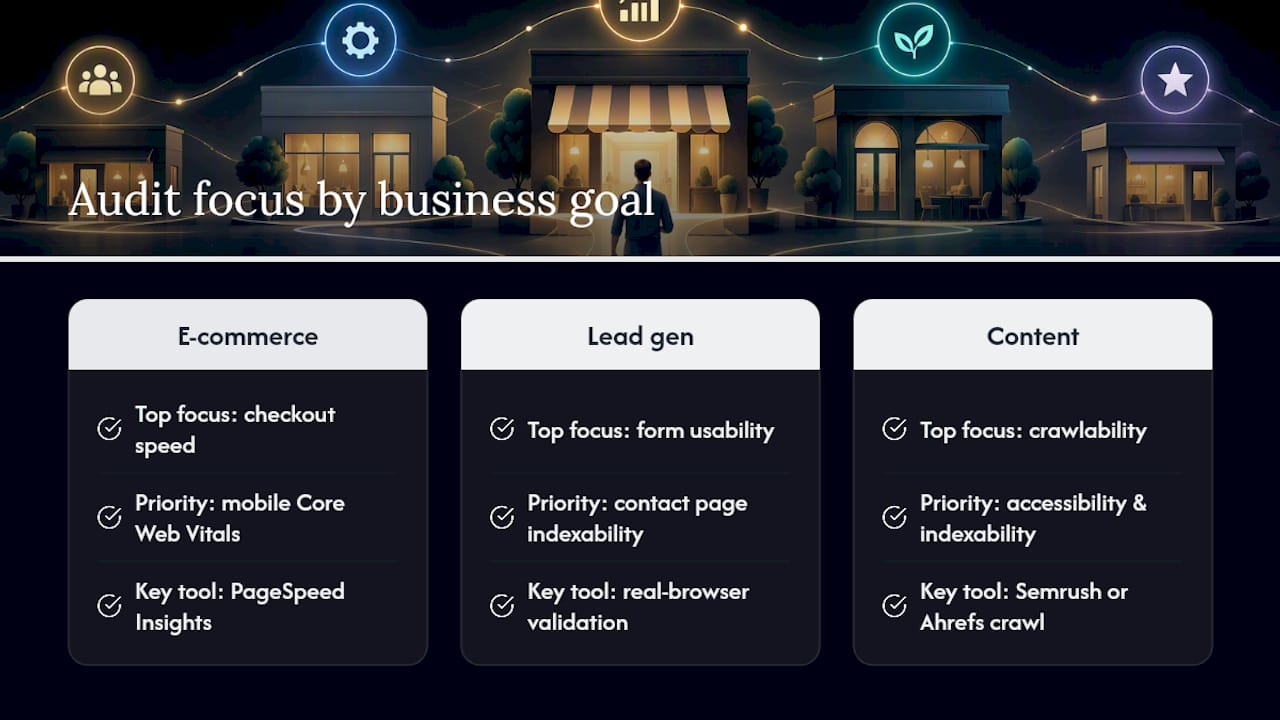
Start by naming what actually drives revenue on your site. An e-commerce store cares most about checkout page speed and mobile Core Web Vitals, since a slow cart page bleeds sales directly. A lead-generation business cares more about form usability, contact page indexability, and whether its highest-converting landing pages rank at all. A content or media site cares about crawlability and accessibility across hundreds of pages, since a small percentage improvement in visibility compounds across volume.
Once you know the goal, you can weight the audit results accordingly. If your goal is conversion, a slow product page outranks a missing alt tag on a blog post nobody reads. If your goal is organic growth, a noindex mistake on your best-performing category page outranks a minor color contrast issue on a legal disclaimer.
This also determines which tool earns its keep. A conversion-focused business gets more value from PageSpeed Insights and real-browser validation on its money pages. A content-heavy business gets more value from a full Semrush or Ahrefs crawl that surfaces indexability problems across its entire archive. Define the goal before you run the audit, not after you're staring at 40 flagged issues wondering where to start.
How Do You Turn Health Check Results Into Business Impact?
A Lighthouse score of 62 or a list of 40 flagged SEO issues means nothing on its own. The skill is translating a technical score into a business consequence someone in a leadership meeting will actually care about.
Start by tying each finding to a specific page and its role in revenue. A performance issue on your homepage matters more than the same issue on a rarely-visited terms-of-service page, even if both score identically in a crawler's output. Rank fixes by where they sit in the customer journey, not by how the tool happened to sort them.
Next, connect the metric to a behavior. A Cumulative Layout Shift problem on a product page often means buttons move while a visitor is trying to click "Add to Cart," which shows up downstream as abandoned carts, not just a lower Lighthouse number. A missing meta description on a high-traffic blog post shows up as a lower click-through rate in Search Console, not as an abstract "SEO issue."
Finally, size the fix against the effort. A compressed hero image might take twenty minutes and meaningfully improve load time on your top landing page. A full site migration to fix a structural crawlability problem might take weeks. Both are valid, but only one belongs at the top of this week's backlog. Tools like Gostellar's performance metrics guide can help translate raw scores into the KPIs your team already tracks, so a health check report turns into a conversation about revenue instead of a spreadsheet nobody reads twice.
What Small Sites Get Wrong Most Often
The same handful of mistakes show up again and again across small business audits. Oversized, uncompressed images are the single most common performance killer. Third-party tag bloat, tracking pixels, chat widgets, review plugins stacked on top of each other, is a close second.
Expired TLS certificates catch teams off guard more often than you'd expect, usually because renewal was set to manual and nobody owned it. And accidental noindex tags left over from a staging site migration have quietly killed more organic traffic than any algorithm update.
The fast wins are just as consistent: compress and lazy-load images, defer anything noncritical from the initial page load, and audit your redirect chains for anything pointing to a dead end. None of these require a developer with years of specialized experience. They require someone actually reading the audit output and acting on it within the week, not filing it away for "someday."
— Juan
An Adjacent Way to Validate Every Fix You Ship
Fixing what a health check flags is only half the job. You still need to know whether the change you shipped actually helped a real visitor convert, not just improved a Lighthouse number. That's a different question than the one PageSpeed Insights or a Semrush crawl answers, and it's where Gostellar fits in.

An A/B testing platform built to test changes like a faster checkout flow or a redesigned landing page without slowing your site down further, since the tracking script itself is designed to stay minimal. Once your health check backlog is fixed, run the before-and-after as a live experiment instead of guessing whether the change moved the needle. Real-time analytics show you the actual conversion impact, not just a synthetic score. Plans run from a free tier for smaller sites up through higher service levels as your traffic grows. Set up your first experiment on the Gostellar pricing page and see whether your latest fix actually moved conversions, not just your Lighthouse score.
Tools and Docs Worth Bookmarking
- PageSpeed Insights: official Lighthouse and CrUX reports for any public URL, free.
- Ahrefs Site Audit: deep technical crawl with severity-tiered issue lists.
- Semrush Site Audit: scheduled full-site scans with trend tracking over time.
- Sitewatch: fast integrity scans for SSL, broken assets, and mixed content.
- Gostellar's website optimization checklist: turns audit findings into an execution backlog.
FAQ
What Is a Website Health Check?
A website health check is an assessment of how well a site performs across speed, SEO crawlability, security, and accessibility. It typically combines a free tool like PageSpeed Insights for performance with a crawler or scorecard tool for the other three areas.
How Do I Check My Website's Health for Free?
Run PageSpeed Insights on your key pages for a Lighthouse-based performance and Core Web Vitals score, then run a free SEO snapshot through Semrush's checker and a quick integrity scan for SSL and broken assets. Together those three free checks cover the four pillars most audits recommend without spending a dollar.
How Can I Tell if a Website Is Actually Good?
A genuinely healthy site loads quickly, shows up correctly in search results, runs on a valid SSL certificate, and works for visitors using screen readers or keyboard navigation. Running a Lighthouse audit alongside a basic security check gives you a reliable read on all four in a few minutes.
What Is an HTTP Health Check?
An HTTP health check is a technical uptime test where a monitoring tool sends a request to your server and confirms it returns a successful status code within an expected time window. It's typically automated and run continuously, alerting a team the moment a site goes down or starts timing out.
Does Gostellar Perform Web Health Checks?
Gostellar isn't a health check or audit tool. It's an A/B testing platform you use after fixing issues a health check flags, to confirm the fix actually improved conversions for real visitors rather than just a Lighthouse score. Current plans and pricing are listed on the Gostellar site.
Recommended
Published: 9/21/2026