
Demo Websites for Testing: A Marketer's Guide
TL;DR:
- Demo websites provide marketers and product teams with risk-free environments to test campaigns and workflows before affecting live systems. Using varied demo environments enhances testing coverage, reliability, and process resilience. Regularly practicing and breaking things in these labs builds confidence and improves campaign launch quality.
A demo website for testing is a free, isolated web environment that simulates real application features so marketers and product teams can practice, evaluate, and refine digital strategies without touching live data. These environments, sometimes called sandbox sites or practice applications, are the industry standard for safe experimentation. They let you run usability checks, simulate user journeys, and trial analytics integrations before anything goes live. For teams that need to move fast without breaking things, they are the most practical starting point available.

What is a demo website for testing, and why does it matter?
A demo website for testing is defined as a free, isolated platform that mimics real web application features without any risk to live systems or real user data. The word "demo" here is informal. The recognized industry term is "test environment" or "sandbox environment," and both phrases describe the same concept: a controlled space where failure has no consequences.
For marketers and product teams, this matters for one specific reason. You can validate a campaign flow, check a checkout funnel, or test a form submission without waiting on a developer or risking a broken experience for real customers. The feedback loop shrinks from days to hours.
These environments also support structured quality assurance (QA) practices. QA is the discipline of verifying that a product works as intended before release. Demo sites bring QA thinking into marketing workflows without requiring any engineering background.
What types of demo websites exist for marketing and product teams?
Demo sites categorize into three broad groups: practice pages, full application demos, and challenge environments. Each serves a different testing goal.
Practice pages are simple, single-purpose pages built around one UI element, such as a login form, a dropdown menu, or a date picker. They are ideal for learning how a specific interaction works before you test it in a real campaign.
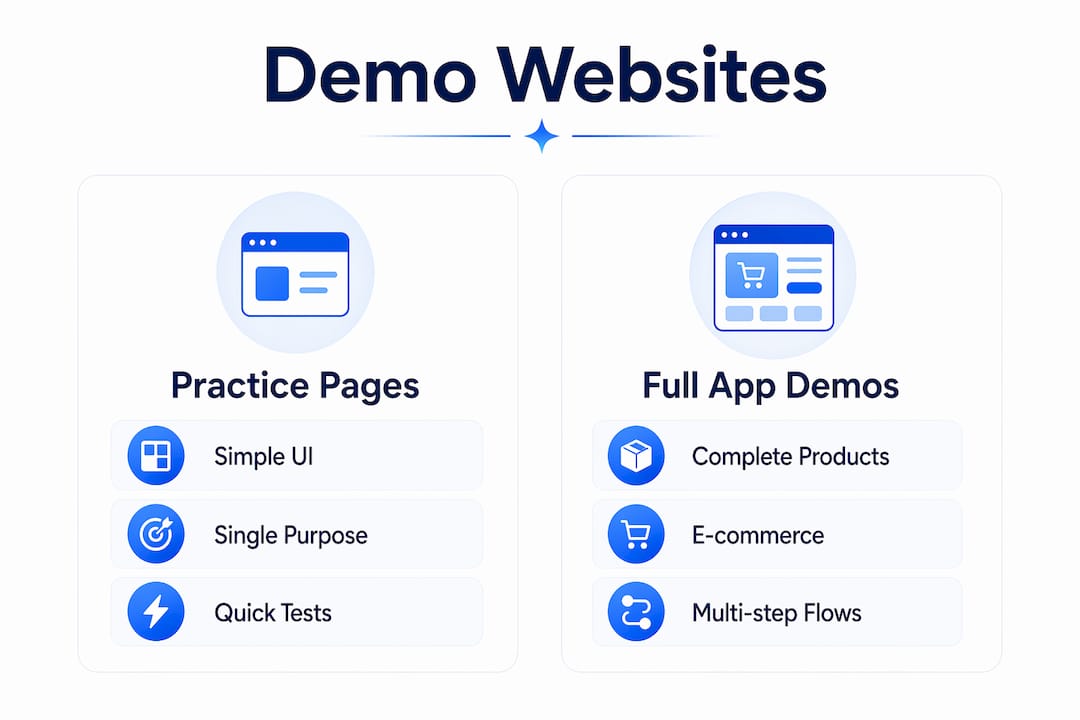
Full application demos simulate complete products, including e-commerce stores, dashboards, and multi-step checkout flows. Sites like SauceDemo.com and DemoQA offer varied UI workflows that reflect real marketing scenarios. These are the most useful for product teams evaluating conversion paths or testing analytics integrations.
Challenge environments are intentionally complex. They include broken elements, delayed responses, and edge cases designed to expose gaps in your testing approach. Advanced teams use these to stress-test their processes before a major launch.
Here is how each type maps to common marketing and product testing goals:
- Basic UI practice sites: Test individual form fields, buttons, and navigation elements. Use these when validating that a landing page interaction works as expected.
- E-commerce demo apps: Simulate full purchase flows including cart, checkout, and confirmation pages. Use these to audit conversion funnels and identify drop-off points.
- API testing environments: Connect to back-end data sources in a controlled way. Use these when testing analytics integrations or marketing automation triggers.
- Accessibility practice sites: Evaluate whether pages meet WCAG (Web Content Accessibility Guidelines) standards. Use these before launching campaigns targeting broad audiences.
- Automation practice websites: Run scripted tests against predictable environments. Use these to build repeatable test plans for recurring campaign checks.
The key insight is that no single demo site covers every scenario. Marketers who rely on one environment tend to develop blind spots. Rotating across site types builds a more complete picture of how your product or campaign performs under different conditions.
How do you choose the right demo site for your goals?
The right demo site matches your current testing objective, not your skill level. Choosing by complexity alone is the most common mistake teams make.
Start by defining what you need to validate. A team checking whether a form submission triggers the correct confirmation email needs a different environment than a team stress-testing a checkout flow under high traffic. The objective drives the selection.
Pro Tip: Before selecting a demo site, write one sentence describing exactly what you want to learn from the test. If you cannot write that sentence, you are not ready to choose a site yet.
The table below outlines the key feature categories to evaluate when selecting a sample website for testing:
| Feature category | What to look for | Best for |
|---|---|---|
| UI complexity | Range of interactive elements (forms, modals, dropdowns) | Usability and funnel testing |
| API access | REST endpoints with documented responses | Analytics and automation integration checks |
| Performance scenarios | Slow-loading pages or delayed responses | Page speed and user experience evaluation |
| Accessibility support | ARIA labels, keyboard navigation, screen reader compatibility | Inclusive design and compliance checks |
| Reset capability | Ability to clear test data and start fresh | Repeatable manual and automated test runs |
Sustainable test frameworks emerge from practicing across environments that cover different technologies and UI patterns. A demo site that only offers one type of interaction will not prepare your team for the variety they will encounter in real campaigns.
One underrated criterion is reset capability. A good test demo site lets you clear state and repeat a test from scratch. Without that, you cannot confirm whether a fix actually worked or whether the first test just happened to pass.
How to use a demo website for marketing testing, step by step
Using a dummy website for testing effectively requires a structured approach. Ad hoc clicking rarely produces useful findings.
-
Familiarize yourself with the environment. Spend 15 minutes exploring the demo site without a test plan. Click every button, submit every form, and note what happens. This exploration phase surfaces unexpected behaviors before you start formal testing.
-
Define your test objective. Write a single sentence: "I am testing whether [action] produces [expected result]." For example: "I am testing whether clicking 'Add to Cart' updates the cart count in the header." Vague objectives produce vague findings.
-
Run usability checks manually. Navigate the site as a real user would. Follow the path a customer takes from landing page to conversion. Note any friction points, confusing labels, or broken interactions. This is called manual testing, and it catches issues that automated scripts often miss.
-
Set up your analytics tracking. Marketers and product teams use demo environments to safely trial analytics integrations before connecting them to live properties. Configure your tracking tags in the demo environment first. Confirm that events fire correctly before touching your production site.
-
Run A/B test simulations. Demo sites let you test two versions of a page element, such as a headline or a call-to-action button, without affecting real visitors. Document which version performs better in the controlled environment. Use those findings to inform your live experiment setup.
-
Build a reusable test plan. After completing a test, write down the steps you followed. A reusable test plan is a simple document listing the actions, expected results, and actual results for each step. You do not need technical skills to create one. A shared spreadsheet works fine.
-
Review and iterate. Compare your expected results against what actually happened. If results do not match, adjust one variable and retest. The no-code testing approach works well here because it keeps the focus on outcomes rather than technical configuration.
Pro Tip: Create a dedicated folder in your shared drive for test plans from each demo site session. After three or four sessions, you will have a library of reusable checklists that cut your testing time in half.
Following a marketing automation checklist alongside your demo site sessions helps teams connect individual test findings to broader campaign workflows.
How do you troubleshoot common demo site testing challenges?
Demo environments are safe, but they are not always smooth. Many demo sites include intentionally broken elements and synchronization issues to build more resilient testing habits. Knowing what to expect prevents frustration.
The most common challenges and how to handle them:
- Synchronization errors: A page element loads slower than expected, causing your test to fail even though the feature works correctly. The fix is to add a deliberate wait step before interacting with the element. In manual testing, this means pausing for two to three seconds before clicking.
- Flaky results: A test passes sometimes and fails other times with no clear reason. This usually means the test depends on timing or state that changes between runs. Rebuild the test with a fresh reset of the demo environment before each run.
- Environment limitations: Some demo sites do not support certain browser types or screen sizes. If your campaign targets mobile users, confirm that the demo site renders correctly on a mobile viewport before drawing conclusions from your tests.
- Over-reliance on one site: Using multiple demo sites prevents your test plans from becoming too tailored to one specific implementation. Rotate between at least two or three environments to build adaptable processes.
- Missing real-world complexity: Basic demo sites sometimes feel too clean. If your tests always pass, the environment may not be challenging enough. Move to a challenge-level site that includes edge cases and broken interactions.
The most productive mindset shift is treating every failed test as a data point, not a setback. A demo environment exists precisely so that failure is free. Teams that embrace this tend to catch more issues before launch than those who treat testing as a box-checking exercise.
Key Takeaways
Demo websites for testing give marketers and product teams a free, risk-free environment to validate campaigns, audit funnels, and build repeatable test processes before anything touches a live system.
| Point | Details |
|---|---|
| Three site categories | Practice pages, full app demos, and challenge environments each serve distinct testing goals. |
| Match site to objective | Define what you want to learn before selecting a demo environment, not after. |
| Reset capability matters | A site that lets you clear state and retest is far more useful than one that does not. |
| Rotate environments | Using multiple demo sites builds test processes that hold up across different real-world conditions. |
| Manual and automated testing work together | Manual exploration catches what scripts miss; automation confirms repeatable outcomes at scale. |
What I have learned from treating demo sites as a real testing lab
Most marketing teams treat demo websites as a one-time orientation tool. They click around for 20 minutes, decide the site "works," and move on. That is the wrong approach, and it wastes the most valuable thing a demo environment offers: consequence-free repetition.
The teams I have seen get the most out of these environments treat them like a real testing lab. They run the same test five times. They deliberately break things. They try to make the site fail. That habit transfers directly to better campaign launches because the team has already seen what failure looks like and knows how to respond.
The other thing most articles will not tell you is that demo environments remove the fear of failure in a way that nothing else does. Beginners who are afraid to touch a live site will experiment freely in a sandbox. That confidence compounds over time. A marketer who has run 50 tests in a demo environment makes better decisions on live campaigns because they have already internalized what good test design looks like.
My honest recommendation: stop using demo sites only when you are learning something new. Use them every time you are about to make a significant change to a live campaign or product flow. The 30 minutes you spend validating in a sandbox will save you hours of incident response later.
— Juan
Gostellar makes marketing testing accessible without the complexity
Running tests in demo environments is a strong habit. Bringing those findings into live campaigns requires a tool that keeps the same simplicity.

Gostellar is built for exactly that transition. The platform offers a no-code visual editor, real-time analytics, and A/B testing capabilities in a single lightweight tool that adds only 5.4KB to your page load. Teams can set up experiments, track goal completions, and read results without writing a single line of code. For marketers who have practiced in demo environments and are ready to test on live traffic, Gostellar's testing platform provides the structure to do it cleanly and confidently. A free plan is available for sites with under 25,000 monthly tracked users.
FAQ
What is a demo website for testing?
A demo website for testing is a free, isolated web environment that simulates real application features for safe practice and evaluation. It is also called a sandbox or test environment in standard QA terminology.
What is the difference between manual and automated testing on demo sites?
Manual testing involves a person navigating the site and recording observations, while automated testing uses scripts to repeat the same actions programmatically. Most marketing teams benefit from starting with manual testing before adding automation.
Can marketers use dummy websites for testing without coding skills?
Yes. Many demo sites and testing tools, including Gostellar, are designed for non-technical users. Manual test plans require only a spreadsheet and a clear objective, not programming knowledge.
How many demo sites should a team use regularly?
Using at least two or three different demo environments builds more adaptable test processes. Over-reliance on a single site causes test plans to become too specific to one implementation and less useful in real-world conditions.
Are demo websites useful for A/B testing practice?
Demo sites are well-suited for practicing A/B test design, including defining variants, setting success metrics, and interpreting results. Running simulations in a controlled environment before going live reduces setup errors on real campaigns.
Recommended
Published: 7/6/2026