
No-Code A/B Testing for SMBs: Why Gostellar Wins
For small marketing teams that need a no-code experiment runner right now, Gostellar is the clearest pick. Two reasons stand out:
- Marketer-first setup with minimal performance cost. The visual editor lets you build and launch variations in a browser with no developer involvement, and the script weighs just 5.4KB — light enough that it won't drag your page speed scores into the red.
- Real-time analytics, a free starter plan, and features that cut developer dependency. You get live conversion data, goal tracking, and dynamic keyword insertion without writing a line of code. The free tier covers a monthly user count suitable for most early-stage SMB programs.
One qualifier: if your tests touch backend logic, payments, or mobile-app parity, a server-side tool with engineering support is the right call. For everything on your marketing site and landing pages, read on.
Key Takeaways
The most effective no-code A/B testing setup for SMBs combines a marketer-owned visual editor, a lightweight script, and time-boxed directional analysis over rigid significance thresholds.
| Point | Details |
|---|---|
| Editor independence is the priority | If building a variation requires a developer, tests stop shipping — choose a true visual editor. |
| Script size affects test validity | Gostellar's 5.4KB script minimizes page-speed impact, keeping test conditions clean. |
| Free tier covers early programs | Gostellar's free plan supports up to 25,000 monthly tracked users before any cost. |
| Two-week directional checks beat long waits | Pair quantitative trends with session replay data to make confident calls on low-traffic pages. |
| Gostellar fits the SMB use case | Visual editor, real-time analytics, and a free starter plan make it the practical first choice for marketing-led experimentation. |
Table of Contents
- What must a no-code A/B testing platform do for small teams?
- Why Gostellar fits SMB needs
- How to launch your first no-code A/B test in 7 steps
- How should SMBs analyze results and set stopping rules?
- What are the technical considerations for client-side testing?
- What does pricing look like for SMB A/B testing tools?
- What questions should you ask vendors before choosing a tool?
- The pragmatic case for just starting
- Gostellar: start your first experiment today
- Sources
What must a no-code A/B testing platform do for small teams?
The shortest answer: it has to let a marketer ship a test without filing a ticket. That means a WYSIWYG visual editor where you click, edit, and publish a variation directly in the browser. No HTML, no CSS, no waiting.
Beyond the editor, five capabilities separate tools that actually get used from ones that collect dust.
Targeting and segmentation let you run tests on specific audiences — new visitors, traffic from a paid campaign, or users on a particular device. Without it, you're testing noise. Goal and metric wiring connects your variation to a real conversion event: a form submit, a button click, a purchase. If wiring a goal requires a developer, most marketing teams never do it properly.
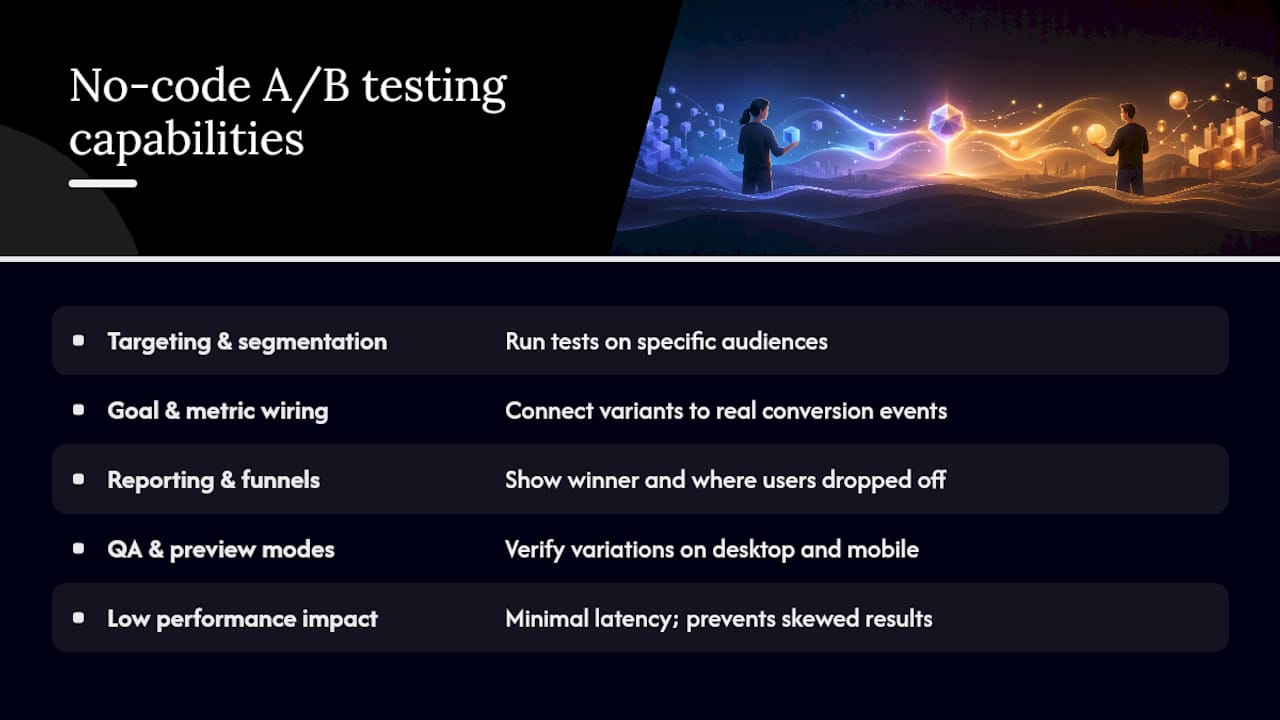
Result reporting with conversion funnels shows you not just which variant won, but where users dropped off. QA and preview modes let you verify the variation looks right on desktop and mobile before a single real visitor sees it. And low performance impact matters because a slow script adds latency that skews your results and frustrates users before the test even runs.
No-code visual editors let marketers implement changes without engineering support — which is the whole point when marketing owns the experimentation program. On the integration side, look for analytics exports (Google Analytics 4, Segment), consent management platform (CMP) compatibility, and tag manager support. Billing models vary too: some tools charge by pageviews, others by tested users. Know which one you're buying before you sign.
Pro Tip: The single capability that predicts whether a marketing team will actually ship tests is editor independence paired with a one-click QA preview. If either requires a developer, the program stalls within weeks.
Recent no-code platforms now include AI-generated variants, segmentation, and sequential testing — features that used to require a dedicated experimentation engineer.
Why Gostellar fits SMB needs
Gostellar maps directly to every capability above. The visual editor covers headline edits, CTA copy, hero images, and layout changes — all in-browser. Goal tracking handles click events, form submissions, and custom conversion events. Targeting lets you segment by traffic source, device, or URL pattern. Real-time reporting surfaces conversion rates as data comes in, not 24 hours later.
The performance story is concrete. Gostellar's script loads at a size significantly smaller than most visual editors add to a page. Typical client-side testing scripts run considerably heavier, which means measurable latency on mobile connections. At 5.4KB, the impact on Core Web Vitals is minimal.

The free starter plan covers up to 25,000 monthly tracked users, which gives most SMBs a real runway to prove value before spending anything. Marketers have shipped tests on landing pages, pricing pages, and paid-traffic destinations without touching the codebase. That's the use case Gostellar is built for.
For support, Gostellar provides documentation, onboarding templates, and direct support channels. The split testing platform guide for marketers is a practical starting point if you want a structured walkthrough before your first test.
How to launch your first no-code A/B test in 7 steps
This checklist gets you from zero to a running experiment without a single developer ticket.
- Install the script. Paste the 5.4KB Gostellar snippet into your site's
<head>tag or add it via Google Tag Manager. Verify it fires in the browser console. - Write a hypothesis. Format it as: "Changing [element] for [audience] will increase [metric] because [reason]." Use the hypothesis templates here if you're starting from scratch.
- Build your variation in the visual editor. Click the element you want to change, edit it, and save. No code required.
- Wire your goal. Select the conversion event that matters — a button click, a form submit, a page visit. Confirm it fires correctly in the goal debugger.
- Preview and QA before launch. Check the following before you go live:
- Variation renders correctly on desktop and mobile
- Privacy/consent banner still displays properly
- Page load time looks normal in DevTools
- Goal fires when you complete the target action
- Set your traffic split and launch. A 50/50 split is standard for most tests. Narrow splits (10/90) make sense only when you're protecting a high-revenue page from an unproven variant.
- Monitor and capture learnings. Check results after two weeks. Document what you learned regardless of outcome — a losing test that reveals why users behave a certain way is worth as much as a winner.
A consistent directional trend combined with session replay data is often enough to make a confident call and keep momentum going.*
For landing-page-specific test setups, the steps above apply directly with a few page-specific goal configurations.
How should SMBs analyze results and set stopping rules?
Start with the tests most likely to move the needle: headline copy, primary CTA wording, and the hero asset. These elements sit at the top of the funnel and affect every visitor. A 10% lift on a headline beats a 30% lift on a footer element that three people see.
Two problems compound here. First, the test runs so long that seasonality, a campaign change, or a news cycle contaminates the data. Second, the team loses momentum and stops shipping new tests entirely.
For small sites, directional trends over about two weeks combined with qualitative signals let teams act faster than waiting for long-duration confidence intervals. Pair your quantitative trend with session recordings and heatmaps. If the data shows Variant B converting 12% better AND session replays show users engaging more with the new CTA, that's a confident enough signal to ship. Waiting another six weeks for a p-value rarely changes the decision.
Practical conversion rate optimization tactics pair well here — knowing which page elements typically drive lift helps you prioritize which tests to run first.
- Focus primary metrics on one conversion event per test. Multiple metrics invite false positives.
- Use sequential, time-boxed checks (two-week windows) rather than open-ended runs.
- Add a guardrail metric (bounce rate, revenue per visitor) to catch variants that win on clicks but hurt downstream.
- Combine quantitative results with qualitative behavioral signals before calling a winner.
Statistic callout: Teams that pair directional A/B results with session replay data make faster, more confident decisions than those relying on significance thresholds alone.
What are the technical considerations for client-side testing?
The core decision is client-side vs. server-side: no-code visual editors are right when marketing needs to ship tests without engineering, while server-side tools are required for backend logic or cross-platform product tests.
| Factor | Client-side (visual editor) | Server-side |
|---|---|---|
| Who runs tests | Marketing, no code needed | Engineering required |
| Best for | Landing pages, CTAs, copy, layout | Payments, app logic, multi-platform |
| Flicker risk | Present — mitigated by async loading | None |
| Script overhead | 5.4KB (Gostellar) | None on front end |
| Setup time | Minutes | Days to weeks |
For client-side tools, the performance checklist looks like this:
- Script loads asynchronously so it never blocks page rendering
- Flicker mitigation (anti-flicker snippet or CSS hiding) is configured before launch
- Script is served from a CDN for global latency consistency
- CMP/consent integration fires before the experiment activates for GDPR-adjacent compliance
On integrations: confirm your tool exports to your analytics stack (GA4, Segment, Mixpanel), supports Google Tag Manager deployment, and can sync experiment data to your CRM or marketing automation platform.
One concurrency note: running two overlapping tests on the same page element for the same user segment creates measurement conflicts. Most tools handle this with mutual exclusion settings — verify yours does before scaling to multiple simultaneous tests.
What does pricing look like for SMB A/B testing tools?
Independent reviews show developer-first platforms often offer generous free tiers, while marketing-focused visual editors typically start around several hundred dollars per month. The billing model matters as much as the headline price.
Common billing structures:
- Tested-user billing: you pay based on how many unique users enter an experiment. Predictable for steady traffic, but promotional campaigns can spike costs fast.
- Pageview billing: simpler, but penalizes high-traffic pages even when few users are actually in a test.
- Flat monthly tiers: easiest to budget; usually tied to a traffic ceiling.
Gostellar's free plan covers up to 25,000 monthly tracked users — enough for most SMBs to run real tests and prove ROI before upgrading. Paid tiers scale with traffic volume and unlock features like advanced segmentation and priority support.
Pro Tip: Before any campaign, check your tool's definition of a "tested user" and its overage policy. A promotional push that doubles your traffic for two weeks can trigger a billing tier jump you didn't plan for.
When a free tier suffices: you're under the traffic ceiling, testing one or two pages, and don't need advanced segmentation. When to upgrade: you're running concurrent tests across multiple pages, need custom audience targeting, or want dedicated support during a high-stakes launch.
For a broader look at A/B testing platforms for marketers, the platform guide covers how to match features to traffic profiles.
What questions should you ask vendors before choosing a tool?
A practical vendor checklist covers editor workflows, QA preview modes, billed metric definitions, and support availability. Here's what to ask on a demo call:
- Can a marketer build and launch a variation without filing a developer ticket?
- Does the tool have a QA preview mode that works across devices before launch?
- How is the billed metric defined, and what happens during a traffic spike?
- What analytics platforms does it export to natively?
- How long is data retained, and can you export raw experiment logs?
- What's the SLA for support, and is there live chat or only email?
Red flags to watch for:
- Opaque billed metrics with no overage cap
- No QA preview or device testing mode
- Script size above 20KB with no async loading option
- Targeting limited to URL rules only (no audience or traffic-source segmentation)
- Documentation that's sparse or clearly out of date
Negotiation tips for SMBs: Ask for a 30-day trial period before committing to an annual contract. Request traffic-based credits if you're running an initial campaign during onboarding. Some vendors offer agency or partner credits for teams bringing multiple client accounts.
Involve three people in the decision: the marketing owner who will run tests daily, one engineering contact who can verify script deployment and integrations, and an analytics owner who confirms data flows correctly into your reporting stack. That's it. More stakeholders slow the decision without improving it.
The pragmatic case for just starting
Most growth teams spend too long evaluating tools and not long enough running tests. The experimentation culture — the habit of forming a hypothesis, shipping a variant, and learning from the result — matters more than which platform you choose.
Pick a tool that removes friction for the person running the tests. If that's a marketer, they need a visual editor and a one-click QA preview. If tests start requiring developer tickets, they stop happening. When you do need engineering in the loop — cross-platform product tests, payment flows, backend logic — bring them in deliberately for those specific experiments, not as a default for every test.
The teams that compound the fastest aren't the ones with the most sophisticated statistical frameworks. They're the ones that ship a test every two weeks, document what they learned, and apply it to the next one.
Gostellar: start your first experiment today
Gostellar gives SMB marketing teams a no-code experiment runner that's fast to install, light on your pages, and built so marketers can ship tests without waiting on engineering. The 5.4KB script, visual editor, and real-time analytics cover everything a small team needs to run a credible experimentation program from day one.

Ready to run your first test? Start free at Gostellar — no credit card required for the free plan. From there:
- Install the lightweight script via tag manager or a single
<head>snippet - Run your first experiment using the 7-step checklist and provided hypothesis templates
- Monitor results in real time and document your first learning within two weeks
Sources
- How to Choose the Right A/B Testing Tool for Your Team: A Practical Guide
- Stop Chasing Statistical Significance: The Small Site A/B Testing Playbook | Nova Pixel Insights
- A/B Testing in No-Code Applications: Implementing Data-Driven Design in 2025 | Markaicode
- A/B Testing Tools: How to Find the Best Solution - e-dialog
Recommended
Published: 8/12/2026