
Make $5–$30 Per Test as a TryMyUI Tester: How to Get Approved
Yes, you can sign up as a TryMyUI tester right now and get paid for evaluating websites and apps. Most approved tests pay between $5 and $30, with $10 the figure most reviewers cite as typical, and payment lands in your PayPal account once a client approves your work. Your first move: register with an email tied to PayPal, then complete the unpaid qualification test that decides whether you get real invites.
TL;DR:
- Payment is generally around $10 per approved test, with some tests paying up to $30, but approval depends on quality and detailed narration.
- Fast response to invites and a complete, up-to-date profile boost the chances of earning more tests regularly.
- Tests last 20 to 50 minutes, with pay based on complexity, requiring screen and audio recordings that clearly demonstrate your reasoning.
- Requiring PayPal, honest profile info, and adherence to quality standards are essential to avoid rejections and ensure payment.
- Expect irregular test volume due to client demand, with paying opportunities fluctuating and platform income remaining supplementary.
Table of Contents
- What is a TryMyUI tester, and how does the program work?
- How do you sign up and pass the qualification test?
- What does an actual test involve, and how is pay decided?
- How much can you actually make as a tester?
- How do you get more invites and higher acceptance rates?
- Is TryMyUI legit, or are the complaints a red flag?
- What happens after you're approved?
- A tester's first month, in real time
- Turning tester feedback into real conversion gains
- Sources
What is a TryMyUI tester, and how does the program work?
TryMyUI rebranded to Trymata a few years back, but most people searching for tester work still use the old name, so both terms point to the same platform. The company's core business is recruiting ordinary people to run usability tests for companies that need honest feedback on their websites, apps, and prototypes before launch or after a redesign.
You're not reviewing products for fun. You're standing in for the client's actual customer, thinking out loud while you click through a checkout flow or try to find a support page. Companies pay for this because internal teams are too close to their own product to spot what confuses a first-time visitor. TechTimes has covered Trymata's positioning in the broader product analytics market, framing tester feedback as the piece that raw click data can't provide on its own.
Clients request a handful of test formats. Some are unmoderated, meaning you complete tasks alone on camera with no one watching live. Others are live, moderated sessions where a researcher guides you through questions in real time. You'll see desktop browsing tasks, mobile app flows, and early-stage prototype walkthroughs where the "product" is still a clickable mockup.
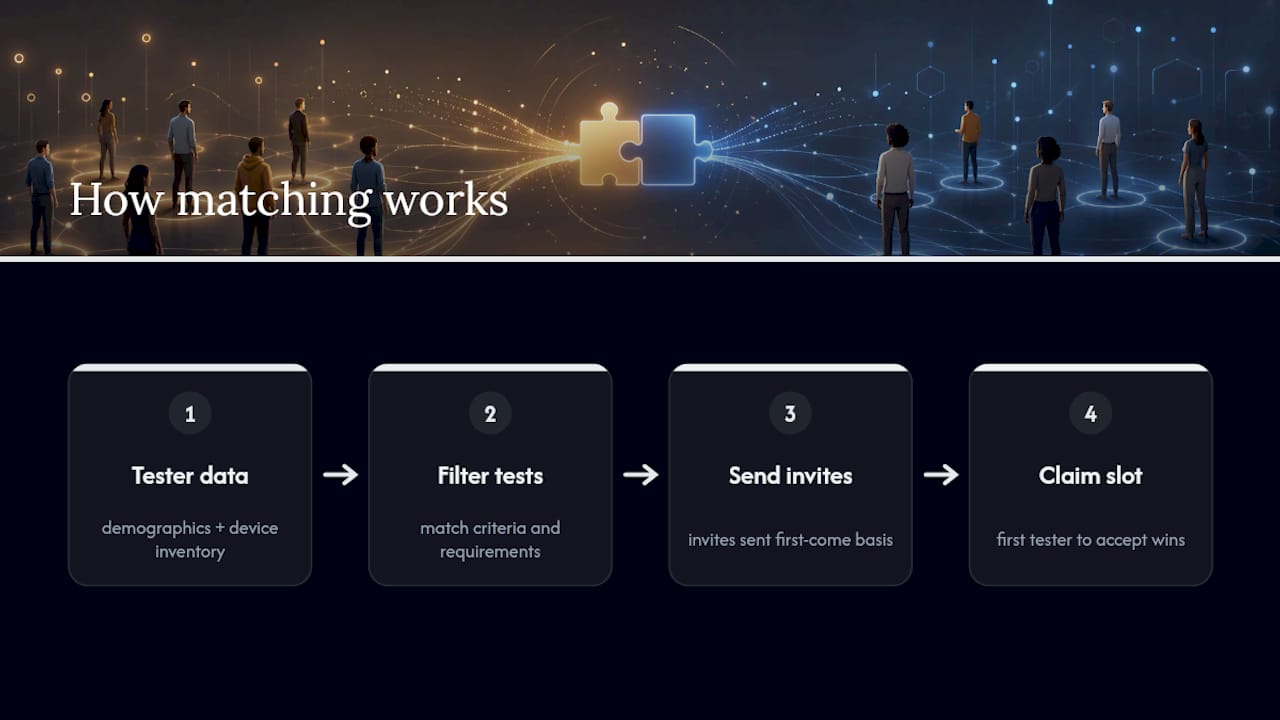
Matching works less like a job board and more like a lottery with a filter. Trymata matches available tests to your demographic profile and device inventory, then sends invites on a first-come, first-served basis. Fill an invite slot fast, or a hundred other testers who match the same criteria will beat you to it. This single mechanic explains most of what testers love and hate about the platform, and it's worth understanding before you build any income expectations. If you already work in growth or product roles, this is the same logic behind UX testing programs that feed real user behavior back into design decisions.
How do you sign up and pass the qualification test?
Getting approved isn't hard, but skipping a step here costs you invites later. Follow this order:
- Register with the right email. Use an email address that's already linked to an active PayPal account. Trymata's tester FAQ is explicit that payment only goes out through PayPal, so a mismatched or nonexistent PayPal account is the single most common reason new testers never get paid.
- Confirm your devices and browsers. List every device you actually use, laptop, phone, tablet, and note the browsers on each. Clients test specific combinations, and a tester with three device entries qualifies for more work than one with a single laptop.
- Fill out your profile completely. Vague or blank fields (income, occupation, shopping habits, apps you use) get you excluded from matching before you ever see an invite.
- Take the qualification test. This is unpaid, runs about 20 to 30 minutes, and it's the platform's quality gate. Graders want to see clear, continuous narration, staying on task instead of wandering into unrelated commentary, and complete answers to every follow-up question.
- Wait for approval, then watch your inbox. Once you pass, invites can arrive at any time, so a fast response matters more than you'd expect.
The qualification test isn't graded on whether you liked the website. It's graded on whether a client could actually use your feedback. Mumbling, long silences, or skipping the "why" behind your actions are the fastest way to fail before you've earned a single dollar.
Pro Tip: Record your qualification test as if a stranger is trying to learn something from listening to it later, because that's exactly what happens. Say what you're looking at, why you're clicking it, and what you expected versus what actually happened.
An accurate profile also does double duty. Guides on building buyer personas for targeted research make a similar point from the client side: the more precisely a business describes its real audience, the better the matching. The same logic runs in reverse for testers, since precise demographic data is what gets you matched to relevant tests in the first place.
What does an actual test involve, and how is pay decided?
A typical session runs 20 to 50 minutes and includes both hands-on tasks and follow-up questions about what you just did. Most tests require screen recording plus audio narration, since the client is paying for your reasoning, not just your click path. A silent recording of someone navigating a site tells them almost nothing.
Pay scales with complexity rather than time alone. A short five-task mobile review might pay on the low end, while a longer moderated session with detailed written feedback lands closer to the top. Aggregated reviewer data puts the typical range at $5 to $30 per test, and PayPal remains the payout method across the board, with money released only after the client reviews and approves the submission.
That last detail catches new testers off guard. Approval isn't automatic. Submit a test, and it sits in a queue until someone on the client side signs off on quality. Most approvals go through fine, but a submission with real problems can get rejected, and rejected tests don't pay.
The recurring reasons testers lose pay:
- Audio too quiet, muffled, or picked up over background noise
- Going off task to explore unrelated pages or comment on unrelated topics
- Leaving required follow-up questions blank or answering with one word
- Long dead air where the client can't tell what you're doing or thinking
Reviewer roundups on Capterra echo this pattern consistently: testers who treat narration as a real skill get approved far more often than those who click through silently and hope the recording speaks for itself.
How much can you actually make as a tester?
Set your expectations here before anything else. Casual testers typically land somewhere between low double digits and a couple hundred dollars a month, and that range depends almost entirely on how many invites you get and how many of those tests get approved. Nobody is quitting a day job on TryMyUI income.
These figures are illustrative, built from the $10 average per test that shows up repeatedly across reviewer testimonials and how-to write-ups, not a guaranteed payout schedule.
The real constraint isn't your skill, it's demand. Clients decide when tests get posted and who they want, and testers with common demographic profiles simply don't get matched as often as those with niche or hard-to-find profiles. Stealth Secrets' review of the platform frames this well: treat it as legitimate supplemental income, not a predictable paycheck, because the gaps between invites can stretch for days or weeks with no warning.
How do you get more invites and higher acceptance rates?
Two things separate testers who earn steadily from testers who log in once and give up: speed and precision. Neither takes special skill, just discipline.
- Keep your profile current. Update devices, browsers, time availability, and demographic fields whenever anything changes, since stale profiles get filtered out of matching silently.
- Respond to invites immediately. First-come, first-served means a five-minute delay can cost you the slot entirely.
- Narrate everything, including your reasoning. Say what you expected to happen before you click, not just what happened after.
- Answer every follow-up question in full sentences. A rushed one-liner reads as low effort to a grader, even if your test itself was fine.
- Register every device you own. A tester who qualifies for mobile, tablet, and desktop tests simply sees more invites than someone stuck on one device type.
Pro Tip: Treat every test like a dry run for the next one. If a test asked you to complete a purchase flow, mentally note what tripped you up, because clients often run similar tasks again with small variations, and the pattern repeats more than you'd guess.
The EasyCowork breakdown makes a point worth repeating here: quality control isn't a suggestion, it's the entire gate between a submitted test and a paid one. Testers who treat narration as a real skill, the same way UI/UX researchers are trained to think aloud during usability sessions, consistently report better acceptance rates than testers who wing it.
Is TryMyUI legit, or are the complaints a red flag?
The complaints are real, but most of them are about limits, not fraud. The most common negative theme across reviewer platforms is low test volume, followed by frustration over rejected submissions and occasionally slow support responses. Capterra's aggregated reviews capture this tension directly: testers who get approved generally say the pay is fair for the time invested, but plenty describe long stretches with no invites at all.
That's a legitimate limitation, not a scam pattern. TryMyUI doesn't owe you a steady stream of work, and the platform's business model depends entirely on client demand, which fluctuates. A slow week says more about client activity than about the platform's honesty.
Here's how to tell a real limitation from an actual red flag:
- Normal limitation: Weeks without an invite. This reflects client demand, not a broken system.
- Normal limitation: A rejected test with no pay. Frustrating, but consistent with the quality standards in the tester FAQ.
- Red flag: Any request to pay a fee to "unlock" tests or a premium tier. Legitimate testing platforms never charge testers to participate.
- Red flag: Anyone asking you to accept payment outside PayPal, through gift cards, wire transfers, or a third-party app you've never heard of.
- Red flag: Emails claiming to be from Trymata that ask for your PayPal password directly rather than linking to the official site.
Payment proof is easy to verify independently. Multiple YouTube walkthroughs show recorded tests alongside PayPal payment screenshots, and that kind of documented trail, combined with the platform's own published payout policy, is a stronger legitimacy signal than any single glowing or scathing review.
What happens after you're approved?
Approval is the start, not the finish line. Once you're in the tester pool, invites arrive whenever a client's demographic and device criteria match your profile, and they go to whoever accepts fastest. There's no scheduled queue where you can predict "I'll get a test on Tuesday." It's reactive by design.
Payments follow a weekly PayPal cadence, released after the client approves your specific submission rather than on a fixed calendar date regardless of approval status. There's typically no minimum balance required before you can cash out, though it's worth checking the current terms on the official tester FAQ since payout policies can shift.
If a test gets rejected and you genuinely believe your work met the brief, most testers report that reaching out to support through the official contact channels is worth the effort, even if response times aren't instant. Keep your account active by logging in regularly and updating your profile whenever your device situation or availability changes. An account that goes quiet for months tends to fall out of the matching rotation, even after approval.
A tester's first month, in real time
My invite came in at 9:47 p.m. on a Tuesday, a mobile shopping app, seven tasks, twenty minutes estimated. I nearly missed it. By the time I opened my laptop, forty minutes had passed, and I almost assumed the slot was gone. It wasn't, but I've since learned that's luck, not the norm.
I narrated everything, including the moment I got stuck finding a return policy page, which turned out to be exactly the kind of friction the client wanted flagged. Payment hit my PayPal five days later: $12.
The honest part nobody tells you upfront: invites are unpredictable, and the gap between that first test and my second was eleven days. What changed my results wasn't luck, it was keeping my microphone closer to my mouth and narrating every decision out loud, step by step, instead of assuming the screen recording would speak for itself.
Turning tester feedback into real conversion gains
Reading tester feedback is one thing. Acting on it fast enough to move a real metric is another problem entirely, and it's the one most marketing teams underestimate. If a tester tells you three people got stuck on your checkout button in the same spot, that's a hypothesis worth testing, not a fact worth assuming.

This is exactly where Gostellar earns its place in a marketer's toolkit. Instead of guessing which usability complaint actually matters, you build a quick A/B test around it using Gostellar's no-code visual editor, no developer ticket required, and watch real visitor data confirm or kill the theory within days. The script weighs just 5.4KB, so testing doesn't slow down the very page you're trying to fix. Goal tracking shows you whether the fix moved the needle, and real-time analytics mean you're not waiting weeks for a report to know if it worked. Small sites tracking under 25,000 monthly users can run this entirely on the free plan. If tester insights like the ones described above are piling up in a spreadsheet somewhere, turn the next one into an experiment on the Gostellar landing page and see what actually moves your conversion rate this month.
Sources
- Website Testing & Usability Testing | Trymata (Formerly TryMyUI)
- TryMyUI Reviews 2025. Verified Reviews, Pros & Cons - Capterra
- TryMyUI Reviews, Requirements & How to Make Money using TryMyUI - EasyCowork
Recommended
Published: 8/28/2026