
Web Usability Test: A Practical Guide for UX Teams
TL;DR:
- Most usability testing is underused, yet testing 3 to 5 users reveals most major issues.
- Using appropriate methods and recruiting real target users ensures actionable insights and reliable results.
A web usability test is a research method that places real users in front of your website to reveal where they struggle, hesitate, or abandon tasks entirely. Only 55% of companies conduct usability testing of websites, yet testing just 3–5 participants uncovers 80% of major usability problems. That ratio makes website usability testing one of the highest-return activities in any UX researcher's toolkit. Tools like Hotjar, Maze, and UserTesting have made web interface evaluation faster and more accessible than ever, but knowing which method to use and how to run it correctly still separates useful data from noise.
What are the main methods for a web usability test?
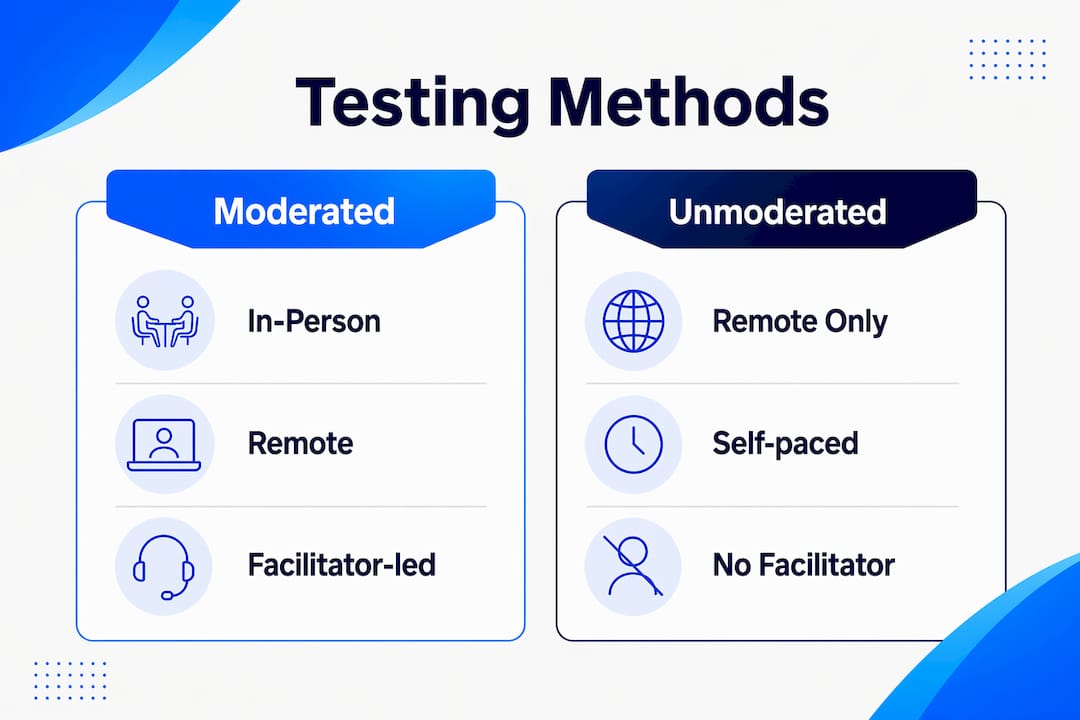
Usability testing methods fall into two primary categories: moderated and unmoderated. Each serves a different purpose, and choosing the wrong one wastes time and distorts findings.

Moderated testing puts a facilitator in the room (or on a video call) with the participant. Moderated sessions run 45–60 minutes, giving the facilitator room to ask follow-up questions and probe unexpected behavior. This depth makes moderated testing the right choice when you need to understand the why behind a user action, not just the what.
Unmoderated testing removes the facilitator entirely. Participants complete tasks on their own schedule, and platforms like Maze or Lookback record their screens and clicks automatically. The payoff is speed. Unmoderated tests deliver results the same day, and you can run many sessions concurrently. The tradeoff is that you lose the ability to ask clarifying questions in real time.
Remote vs. in-person is a separate axis. Remote testing expands your geographic reach and reduces scheduling friction. In-person testing lets you observe body language and environmental context, which matters for physical product interactions or kiosk-style interfaces.
The think-aloud protocol applies to both moderated and unmoderated formats. Participants narrate their thoughts as they work through tasks. Think-aloud methods surface mental models and expose the reasoning behind user decisions, which no click map or heatmap can replicate.
| Method | Best for | Session length | Key tool |
|---|---|---|---|
| Moderated in-person | Deep qualitative insight | 45–60 minutes | Lookback, Zoom |
| Moderated remote | Broad geographic reach | 45–60 minutes | UserTesting, Zoom |
| Unmoderated remote | Speed and scale | Self-paced | Maze, Hotjar |
| Think-aloud (any format) | Mental model discovery | Varies | Any screen recorder |
Pro Tip: Run one moderated pilot session before launching unmoderated tests at scale. A single pilot catches broken task scenarios before they corrupt your entire data set.
How many participants do you need, and how do you recruit them?
The Nielsen Norman Group's research establishes a clear benchmark: each additional participant yields fewer new insights after five sessions in qualitative usability testing. Five users is not a magic number for every project, but it is the right starting point for most qualitative rounds. Quantitative benchmarking studies require larger samples, typically 20 or more participants, to produce statistically reliable scores.
Recruitment quality matters more than sample size. Recruiting actual target users rather than friends, family, or coworkers is non-negotiable. People who know you or your product try to be helpful. That instinct masks real usability problems and produces false confidence in your design.
Screening questionnaires are the practical tool for filtering participants. A well-written screener asks about job role, device usage, prior experience with your product category, and relevant behaviors. It should not hint at what the test covers. Pre-test questionnaires collect baseline attitudes. Post-test questionnaires, like the System Usability Scale (SUS), measure perceived usability after the session.
Practical recruiting options for digital teams include:
- User research panels through platforms like UserTesting or Respondent.io for fast, screened recruitment
- Customer lists filtered by segment, with an opt-in email invitation
- Intercept surveys on your live site using tools like Hotjar to recruit active users mid-session
- Social media screeners posted in relevant communities or LinkedIn groups for niche audiences
- Internal beta users only when the product is internal-facing and they represent the true user population
Pro Tip: Write task scenarios in plain language that describes a goal, not a feature. "Find a winter jacket under $150" works. "Use the filter menu to sort by price" does not. The second version tells participants what to do, which defeats the purpose of the test.
What metrics and observations should you collect?
Effective website usability assessment combines quantitative metrics with qualitative observations. Neither alone tells the full story.
Quantitative metrics to track
Task completion rate is the most direct measure of usability. A participant either completes the task or they do not. Low completion rates on a checkout flow, for example, map directly to the 70.19% global cart abandonment rate that plagues e-commerce sites. Time on task measures efficiency. Long times on simple tasks signal confusion. Navigation paths show whether users follow the intended flow or take unexpected detours. Hesitation points, captured through screen recordings or eye-tracking, reveal where users pause and reconsider.
The System Usability Scale (SUS) is a 10-question post-test questionnaire that converts participant responses into a single score from 0 to 100. A score above 68 is considered above average. SUS gives you a benchmark you can track across design iterations and compare against industry standards.
Qualitative observations to capture
Facilitator notes during think-aloud sessions capture the reasoning behind user actions. These notes should record exact quotes, not paraphrases. A participant saying "I expected this button to be at the top" tells you far more than a note reading "confused by layout."
Categorize issues by frequency and severity after the session. A problem that affects every participant and blocks task completion is a critical fix. A problem that one participant notices but works around is a low-priority observation. This triage prevents teams from spending sprint capacity on edge cases while ignoring systemic failures.
How usability testing differs from A/B testing
Usability testing identifies the cause of friction. A/B testing measures the impact of a proposed fix at scale. They are complementary, not interchangeable. Run a usability test first to understand why users drop off a page. Then use A/B testing to validate whether your redesign actually improves conversion. Gostellar's A/B testing approach covers this workflow in detail for teams ready to move from diagnosis to experimentation.
Common mistakes that undermine usability test results
Most usability test failures trace back to a small set of repeatable errors. Recognizing them before you run a session is far cheaper than discovering them in your data.
-
Testing the wrong people. Friends and coworkers know your product or want to please you. Avoid testing people close to the team and recruit participants who match your actual user profile. The data from biased participants is worse than no data at all.
-
Guiding participants during tasks. When a participant struggles, the instinct is to help. Resist it. Use neutral prompts instead of direct help, such as "What would you do next?" or "What are you thinking right now?" Helping a participant complete a task hides the exact friction point you need to find.
-
Writing unclear task scenarios. Vague tasks produce vague data. Each scenario needs a clear starting point, a realistic goal, and no embedded instructions. Test your task wording on one colleague before the real sessions begin.
-
Ignoring accessibility in your test plan. Accessibility testing integrated into usability tests catches issues that affect users with disabilities and often reveals broader navigation problems that affect all users. Including at least one participant who uses assistive technology costs little and adds significant coverage.
-
Waiting for perfect conditions. Valuable usability tests start immediately with a laptop, a screen recorder, a video call link, and a set of tasks. Waiting for a dedicated lab, a large budget, or a polished prototype means shipping broken experiences in the meantime.
Pro Tip: Record every session, even when you take notes. Facilitators miss details in the moment. Video lets you catch the exact second a participant hesitated, which is often the most important data point in the entire session.
Key takeaways
A web usability test with 3–5 real target users, clear task scenarios, and structured analysis of completion rates and think-aloud observations produces the most reliable picture of where your site loses users.
| Point | Details |
|---|---|
| Start with 3–5 participants | Testing this many users uncovers 80% of major usability problems in qualitative rounds. |
| Match method to your goal | Use moderated testing for depth and unmoderated tools like Maze for speed and scale. |
| Recruit real target users | Friends and coworkers mask problems; screened participants from your actual audience do not. |
| Combine SUS with task metrics | Pair System Usability Scale scores with completion rates and time on task for full coverage. |
| Pair usability tests with A/B testing | Usability testing finds the cause of friction; A/B testing confirms whether your fix works. |
Why I stopped waiting for the "right" conditions to run usability tests
The most common mistake I see digital teams make is treating usability testing as a formal event. They wait for a research budget, a dedicated lab, a polished prototype, or a full sprint dedicated to UX. By the time those conditions arrive, the product has already shipped with the problems a 60-minute session would have caught.
The truth is that a basic usability test requires almost nothing. A laptop, a screen recording tool, a video call link, and five task scenarios. That is it. I have run sessions that changed the direction of a redesign using nothing more than Zoom and a Google Doc. The insight quality from a scrappy test with real users beats a polished study with the wrong participants every time.
The other thing I have learned is that accessibility cannot be an afterthought in usability testing. Teams often treat it as a compliance checkbox separate from UX research. Integrating even one assistive technology user into a standard usability round consistently surfaces navigation issues that affect everyone, not just users with disabilities. It is one of the highest-leverage additions you can make to any test plan.
Finally, the relationship between usability testing and A/B testing is not a competition. Usability testing tells you what is broken and why. A/B testing tells you whether your fix actually moves the needle at scale. Teams that run both in sequence make better decisions faster than teams that rely on either method alone. Start with observation, then validate with data.
— Juan
How Gostellar supports your usability testing workflow
Once your usability tests identify where users struggle, the next step is validating your fixes at scale. Gostellar connects that gap directly.

Gostellar is a no-code A/B testing platform built for marketers and growth teams at small to medium-sized businesses. After your usability findings point to a specific friction point, Gostellar lets you build and launch a test variant without writing a single line of code. Its 5.4KB script keeps your site fast during experiments, and real-time analytics show you which version wins. A free plan covers businesses under 25,000 monthly tracked users. Visit Gostellar to start turning usability insights into measurable improvements.
FAQ
What is a web usability test?
A web usability test is a research method where real users complete tasks on a website while observers record where they struggle or fail. It reveals friction points that analytics data alone cannot explain.
How many users do I need for usability testing of a website?
Testing 3–5 participants in a qualitative round uncovers 80% of major usability problems, according to Nielsen Norman Group research. Quantitative benchmarking studies require larger samples of 20 or more users.
What is the difference between usability testing and A/B testing?
Usability testing identifies the cause of user friction through observation and think-aloud protocols. A/B testing measures whether a proposed fix improves conversion at scale. The two methods work best when used together in sequence.
What tools are commonly used for website usability testing?
Maze and Lookback handle unmoderated and moderated remote sessions respectively. Hotjar provides behavioral analytics like heatmaps and session recordings on live sites. UserTesting offers a full panel recruitment and session platform for teams that need screened participants quickly.
How do I avoid bias in usability test results?
Recruit participants who match your actual user profile rather than friends or coworkers. Use neutral prompts during sessions instead of guiding participants toward correct answers. Screener questionnaires that do not reveal the test's focus help filter out participants with prior knowledge of your product.
Recommended
Published: 6/18/2026