
A Testing Server for SMBs: Performance-First A/B Testing
A testing server, in the marketing sense, is an A/B testing platform. It serves different versions of a page or app to visitors and measures which version drives more conversions, signups, or revenue. This has nothing to do with staging environments or QA infrastructure. If you're a marketer or growth lead, the recommendation is simple: pick a performance-first, no-code platform with real-time analytics and a script small enough that it won't slow down the pages you're trying to optimize.
Gostellar was built around exactly that constraint. A few things worth knowing upfront:
- A lightweight script (5.4KB) that loads without noticeable page delay
- A no-code visual editor, so non-developers can build variations
- A free plan for businesses tracking under 25,000 monthly tracked users (MTU)
Key Takeaways
A performance-first testing server built on discipline, a single KPI per test, and a lightweight script produces reliable results faster than any feature-heavy alternative.
| Point | Details |
|---|---|
| Define one KPI per test | Tie every experiment to a revenue or conversion metric, not a vanity number. |
| Change one variable | Isolate the element you're testing so results are attributable and trustworthy. |
| Run to significance | Target 95% confidence and 7 to 14 days or a set sample size before stopping. |
| Prioritize centrally | Keep a shared experiment log so wins scale across teams. |
| Choose lightweight tools | Gostellar's 5.4KB script and free plan under 25,000 MTU fit SMB testing needs without slowing pages down. |
Table of Contents
- Why a Performance-First Testing Server Matters for Marketers
- How to Choose a Testing Server: A Practical Checklist
- Quick Setup Checklist to Launch Your First Experiment
- Common Pitfalls That Invalidate Tests and How to Fix Them
- Why Gostellar Fits This Approach
- Sources
Why a Performance-First Testing Server Matters for Marketers
Script weight isn't a technical footnote. It's the difference between a clean test and a corrupted one. A heavy or synchronously-loaded script causes flicker, that jarring flash where visitors see the original page before the variation swaps in. Flicker doesn't just look sloppy. It can bias results toward the control, because some users make a decision before the variation ever renders.
Speed also compounds at the organizational level. When test data centralizes automatically instead of living in scattered spreadsheets, teams stop re-running experiments other people already ran. A documented log turns one team's win into five teams' shortcuts.
What a lean testing server gets you:
- Faster page loads, which protects the baseline conversion rate you're trying to improve
- Real-time dashboards that shorten the loop between "test is live" and "we know the answer"
- Fewer engineering dependencies, since no-code editors let marketers ship variations without a dev ticket
The pattern shows up across most mature testing programs: platforms that are native to a channel speed up both setup and the learning cycle, because there's less friction between having an idea and getting it live.
How to Choose a Testing Server: A Practical Checklist
Most SMB teams don't need enterprise experimentation infrastructure. They need something fast, cheap enough to justify against traffic volume, and simple enough that a marketer, not an engineer, can run it. Here's what to check before you commit to one:
- Script size and load behavior. Look for something under 10KB that loads asynchronously and consider running an SEO audit to check page speed and indexing before testing. Anything heavier risks flicker and can quietly drag down your Core Web Vitals scores.
- No-code setup speed. Can a non-developer build a variation in under 15 minutes using a visual editor, or does every test require a dev sprint?
- Statistical rigor. The platform should report significance clearly, ideally against a 95% confidence standard, and handle traffic splitting without manual math.
- Integrations. Check for direct connections to your CMS or site builder (WordPress, Shopify, Webflow, Wix), plus your analytics and ad platforms, so results don't live in a silo.
- Pricing against your actual traffic. Tiered plans based on monthly tracked users only make sense if you know your MTU. Match the free-tier ceiling to your real numbers before assuming you need a paid plan.
- Support and data portability. Confirm you can export raw experiment data and get help fast if a test breaks mid-run.
Pro Tip: Before comparing platforms, check the readiness of the pages you plan to test first. A tracking gap or layout bug will invalidate a beautifully-designed experiment before it even starts.
Quick Setup Checklist to Launch Your First Experiment
Running a clean first test matters more than running a clever one. Follow this sequence and you'll avoid most of the mistakes that quietly poison early results.
- Write a one-line hypothesis and pick one primary KPI. "Changing the CTA color from gray to blue will increase button clicks" is testable. "Improve the hero section" is not.
- Build a single variation that changes one variable. Resist the urge to redesign the whole page. If you change the headline, the image, and the CTA at once, you'll never know which one moved the needle.
- Set your traffic split and minimum sample size before launch. Web experiments generally need 7 to 14 days or enough visitors per variation to reach significance. Decide this in advance so you're not tempted to stop early.
- Install the script and confirm event tracking works. Load the page and watch for flicker. Fire a test conversion event and confirm it lands in your dashboard before you send real traffic.
- Watch the real-time analytics, then stop at significance. Once your KPI hits the confidence threshold or you've reached your target sample size, call the test and document what you learned, win or lose.
Pro Tip: A structured hypothesis-and-KPI step is the single most-skipped part of setup. Teams that skip it end up debating what "success" means after the data is already in.
Common Pitfalls That Invalidate Tests and How to Fix Them
Most failed experiments aren't failures of the tool. They're failures of test hygiene. These five show up constantly in SMB testing programs:
- Running unclean tests. Changing multiple variables at once means you can't attribute the result to anything specific. Fix: one variable, one test, every time.
- Stopping too early. A test that looks like a winner on day two often regresses to the mean by day ten. Fix: set your sample size or duration before launch and stick to it.
- Conflicting tests and seasonality. Running a pricing test during a holiday sale, or two tests on the same page at once, muddies your data. Fix: keep a shared calendar and coordinate across marketing and product teams.
- Performance drag from heavy scripts. Flicker and slow loads bias results toward the control version. Fix: use lightweight, asynchronous scripts, and consider server-side rendering for high-traffic pages.
- Optimizing for the wrong KPI. A test that boosts clicks but tanks revenue per visitor isn't a win. Fix: tie every test to a KPI that maps to revenue or a real conversion event, not a vanity metric.
Pro Tip: Run a quick pre-launch QA pass on every variation before it goes live. Most "confounding factor" problems are actually tracking bugs caught too late.
Why Gostellar Fits This Approach
Everything in this guide points toward one operating principle: the testing server should get out of your way. Gostellar was built around that idea specifically for small and mid-sized teams. The script runs at 5.4KB, light enough to avoid the flicker and load drag that skews results on slower connections. The visual editor lets a marketer build a variation without waiting on engineering, and dynamic keyword insertion lets you personalize landing pages by campaign or search term without building a dozen separate page variants.
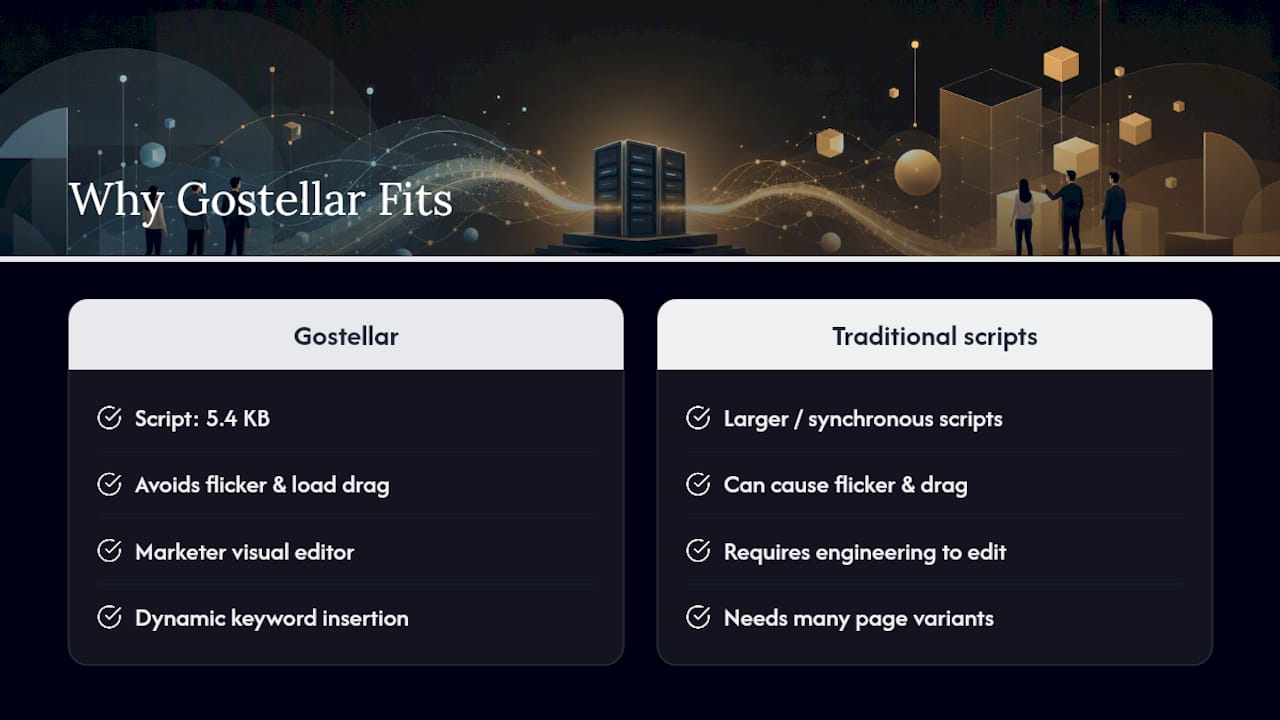
Beyond the editor, Gostellar tracks goals in real time, so you're watching significance build instead of waiting on a weekly report, and it connects directly to WordPress, Shopify, Webflow, Wix, Squarespace, Framer, and Bubble, plus a data API if you need to pipe results into your own reporting stack. Teams tracking under 25,000 monthly tracked users can run on the free plan, which makes it realistic to test the checklist in this guide on a real page before paying for anything. If you're ready to try it, start with Gostellar's free plan, install the script, and run one clean test using the setup checklist above. You'll know within one full test cycle whether it fits your workflow.
Start With Discipline, Not Tools
The platform matters less than most people assume. What separates teams that get real lift from teams that just generate noise is discipline: prioritize the highest-impact, lowest-effort tests first, document every hypothesis and outcome centrally, and resist running five experiments at once because it feels productive.

Start small. Pick one page, one KPI, one variable. Scale only what actually wins, and kill what doesn't fast enough that it doesn't quietly drag on for months. If you want to see this discipline paired with a fast, no-code testing server, try Gostellar and see how quickly a clean first test comes together.
Sources
Recommended
Published: 8/20/2026